Showing posts with label iPod. Show all posts

Sunday, October 9, 2011

Steve

It's been four days and it's still hard to get my thoughts together. I think my mind still can't fathom that he's gone. He shaped my life and the lives of others in ways I never even thought about until now, despite us not knowing him personally.


That Steve Jobs changed the world is not an overstatement. In a personal sense, he is a big reason for me having such a great interest in computers and technology (the other reason being my dad). When I was a wee lad, my dad would bring his work computer home over holiday breaks. The computer was a Mac Plus, the black and white screened all-in-one that was a descendant of the original Macintosh. My dad used the computer to do work, but I sure had a heck of a lot of fun with it. My first exposure to computers had me instantly hooked. I loved everything from the oldschool startup chime to the intuitiveness of the Mac System 6 user interface.


But the true test is to ask whether I still would've been hooked if the computer had been a Windows PC. Ah, but that's a trick question, isn't it? Windows would not exist if it weren't for Steve and his Mac operating system. Don't believe me? Go watch Pirates of Silicon Valley, starring Noah Wyle and Anthony Michael Hall. Besides, back in those days Windows was pretty much nothing, and most non-Apple computers ran the useable but horribly unintuitive DOS. I am certain that if my first introduction to computers was DOS or Windows 1, 2, or 3.0, I would've been repelled. My preference, and my family's preference, has never wavered to this day. There has always been something about Apple's products that transcend price and specs that, if you haven't experienced them, you probably don't understand.


But the success and the impact of Apple and Steve Jobs, as well as my appreciation for them, goes beyond simple personal preferences and money. This is something that a lot of detractors seem to completely miss. Common refrains from the hater camp are that Apple claims to innovate but their successful products are ones that have been done already in the past. That Apple's unwavering adherence to their often draconian policies severely hurts the industry and hurts innovation. That Apple's marketing dangerously misleads people into believing their highly priced products can cure the common cold and create world peace. And that Apple doesn't even adhere to their own slogan "Think Different" because they make stuff that's been done before. Even a decade ago, many people held to the believe that Apple's products were just toys compared to their competition, and I even had one friend tell me "Macs are for people who can't afford PCs", which was so wrong in so many ways.


I will address these points individually, and in doing so attempt to explain why Steve's and Apple's accomplishments and contributions must be celebrated. First, people who think Apple just retreads what others have already done are not seeing the big picture. Sure, personal computers were around before the Mac, and MP3 players were around before the iPod, but who used personal computers back then? Only geeks who could stand to use a command line for doing anything besides listing directory contents. And who used MP3 players in their infancy? Well, I didn't know anyone, but I do know that they were hard to use and were mainly the domain of geeks who, again, could stand to get their own MP3s somehow and finagle them onto their clunky portable music player. But when the Mac came along in 1984, and when the iPod launched in 2001, it got regular people excited and regular people understood how to use these machines for the first time. Steve's power was the power to get normal people excited about things that they used to consider silly, complicated nerd paraphernalia. People tend to hate the iPod and the iTunes Store for being a closed ecosystem, but they forget that only Apple's stubbornness and cash could convince the entire RIAA to move into the 21st century in terms of selling their music online. And this is why we have Amazon MP3 and all the other online music stores.


The ultimate example of this, and more, is the iPhone. Before the iPhone was introduced in 2007, the term "smartphone" was synonymous with RIM's Blackberry phones, and to some extent, Palm's phones. And at the time these phones could do email, sure. They could do calendars, messaging, and get on the web. But the web on a mid-2000s smartphone was awful. Web sites were designed to run on browsers made for desktop and notebook computers, and thus when these primitive smartphone browsers attempted to connected them, all they got was some poorly formatted text version that was horrendously inconvenient to navigate. I have no doubt that without the iPhone, smartphones of 2011 would still bear those old stodgy, clunky designs and hundreds of millions of people would not be able to access so much good information in mere seconds, as these phones would still be the domain of businesspeople and rich geeks. Oh and no Android for you! So before you dismiss Apple as not having any original ideas of their own, think about that. Today's Windows computers would not exist, or they would suck way more than they do. Today's music industry would have collapsed due to their inability to adapt to the "digital age". And today's phones would still be clunky contraptions that everyone needs but no one likes to use.


The next issue is Apple's stubborn adherence to their own policies. The company under Steve was uncompromising, headstrong, and aggressive. It creates and enforces strict rules for the use of its operating systems (see Mac OSX and iOS) in the name of preventing dilution of the products and the brand. To this end Apple brings legal action against companies who make products Apple feels is copying them. Apple also has a history of rejecting or removing apps from its iOS app store that thinks violates the developer agreement. Recently the court upheld a ruling for a lawsuit Apple brought against Psystar, a small company that sold "Mac clones" - generic PC boxes that ran Mac OSX. Many see actions like this and others as anticompetitive and harmful to innovation. Perhaps some of them are anticompetitive, and in terms of US law these situations should probably be judged accordingly. But people should also understand the idea behind their actions. Steve (and by extension, Apple) sought to control all parts of their product because he wanted to make really, really great products that people would love. And to do so, he wanted to leave nothing to chance - "chance" being the possibility for someone outside of his control to screw that up. It's this uncompromising dedication to the end user experience that enables their products to be so sought after and valued. In other words, without the stubborn iron first guiding things, Apple's products would not stand out, and there is a very real possibility that no products in the markets Apple currently occupies would be highly desired by anybody. And because their products are so highly sought after, it lights fire under the asses of the likes of Microsoft, Google, Samsung, HTC, RIM, HP, and even Nintendo and the company that makes George Foreman grills. Those who consider the results of Apple's actions hurting innovation need to reexamine their definition of "hurting".


On the idea that Apple oversells its products, all I have to say is "don't you wish your company had the marketing juggernaut that Apple has?" Anyone who says no is a fool. The other side to the coin, however, is the idea of truth in advertising. I'm all for truth in advertising. The thing is, I think Apple actually tends to be more careful with facts than people give them credit for. It's never been about specs or numbers with Apple. It's always been about going after your emotions and grabbing you such that you feel like you "have to have it". The thing detractors don't understand is, when people see these commercials, and they consequently go out and buy the product, they are usually very satisfied with their purchase. Does that sound to you like dishonest marketing? Telling people (not necessarily in so many words) that they're going to love this product, and people buy it and they end up… loving the product? It's not about truth and lies, but about how the products make you feel. Oh, and by the way, they just happen to do what people expect them to do.


My day to day appreciation for what Steve has created at Apple is fairly mundane: I like how Mac OSX feels more than how Windows feels. And I like how iOS feels. These things are a matter of personal preference, and I would get nowhere trying to convince anyone that Apple's stuff is better than Microsoft's or Google's if they have their own strong feelings. But my goal was to examine how no matter whether one likes or hates Steve and Apple, it is a terrible, terrible mistake to discount their contribution to all facets of technology. Without Steve there would be no Windows. Without Steve there would be no Android. Without Steve the music industry would be a 20th century relic. Without Steve our smartphones would be dumb. Without Steve the world would be a world of boring beige boxes that only schools and businesses would bother to use. And without Steve we'd all still be using Parallel and PS/2 ports on our PCs. Steve's stubborn attention to the most minute detail in every aspect of design has made an amazing impact on how we define our aesthetics in technology today.


It has been said that Steve knew what you wanted even if you didn't know that you wanted it. It's so true, and it's been proven time and again, with the iPhone and the iPad. Now that he's gone, who will make us better devices, and who will make us love our technology?


For more reading or viewing, check out the links below:

Godfather of fonts article

Tribute by Leo Laporte et. al at TWiT TV

Think Different video on Youtube

Saturday, November 13, 2010

Game Review - Soosiz

Soosiz - $1.99 (Appshopper Link)

Mario-style platforming games are kind of a hit or miss with the iPhone's on-screen controls. Depending on how the developer implements the buttons, it could be very bad (like Mega Man II), or very good, like the game I'm reviewing right here. For action-platforming games, reflexes are key; being able to jump at a moment's notice to avoid an enemy or obstacle is the difference between life and death. The problem with on-screen controls is that there's no physical feedback for your finger to know whether you've pressed the "right button" (read: the correct part of the screen). In the iPhone port of Mega Man II, I too often found myself pressing not the jump button, but just one or two pixels to the left or right. Yes, that's a problem.

With Soosiz, on the other hand, the developers did a great job. The jump button is big and responsive, as are the buttons to run left and right.

So you're probably wondering "So what is Soosiz? Why is its name so funny?" Well, I can't answer the second question, but I can answer the first. Soosiz is unique in that it takes the 3-D Super Mario Galaxy style gravity mechanic and removes one dimension, to give you a rather fresh side-scrolling (and rotating) experience. In this game, "down" for your character is essentially the center of mass of the platform he's currently standing on.

You play as this strange yellow circle with big feet, big eyes, and green spiky hair. If I didn't know any better, I would think he's a mutated Goomba.

The levels are set up as a collection of worlds broken down into about 6 stages each, along with two or three bonus "collect all the blue coins" stages. The goal in each normal stage is to rescue all your buddies who have been scattered across the land. Some of them grant you special powers like higher jumping and faster running, which last until that stage is complete.

The gravity mechanic alone makes it worth checking out, though if you get dizzy easily, you may want to skip this one.

Soosiz comes in four flavors: iPhone/iPod touch full version, iPhone/iPod touch Lite, iPad full version, and iPad lite. Check out the appropriate lite version to see for yourself.

Check out my Soosiz screenshots at Picasa Web Albums

Game Review - SkullPogo

Skullpogo - $1.99 (Appshopper link)

I really should have written this as a Halloween post, but I guess better late than never. Skullpogo is another simple game that you can pick up and play for a few minutes. As the name implies, you control a skeleton dude on a pogo stick, whose lot in life is to bounce forever and knock out pigs, zombies, bats, black cats, and other pesky creatures. You slide your finger across the bottom of the screen in order to move, and there are on-screen button to control the height of his bounce: low, medium, and high.

The goal, of course, is to get a high score, and in order to do that you try to get special combos. There are also powerups that will allow you to do things like take out multiple enemies at once, or slow enemies down to make it easier to catch them.

There are three different stages: Halloween, Farm, and Classic, each with a different backdrop and slightly different play modes. Skullpogo also includes Openfeint support for tracking high scores and granting Achievements for those who perform special feats.

Skullpogo is a nice game to play for a few minutes at a time, but that's not to take away from its variety. It's very unique, and a lot of fun.

Check out my Skullpogo screenshots here.

Friday, August 27, 2010

Game Review - Bit Pilot

Bit Pilot - $0.99 (Appshopper Link)

Video games have been around for a bit over 30 years now, but in that relatively short time, they've evolved considerably. Just about every aspect of gaming has changed - the graphics, the storytelling, the exposure, and the types that are out there. We've got billion dollar companies churning out games with budgets bigger than Hollywood movies and teams of more than 100 people. Yet despite this shift (or maybe because of it) a new subgenre has emerged in the gaming world - "retro games".

Originally it just included remakes or rereleases of old classics, mainly for nostalgic reasons. You're familiar with these classics: Namco's Pac-Man and Ms. Pac-Man series, Pong, Space Invaders. For whatever reason, people of a certain age like going back to these games in spite of the availability of games that are, at least on the surface, far superior.

Then came the arrival of a new type of retro game. This new type of retro game can be any genre, such as puzzle, action, shooter, etc. but usually includes some or all of the following traits: low-resolution pixelated graphics, 8-bit electronic "chip-tune" music, simple, vibrant color schemes, and lack of a meaningful storyline.

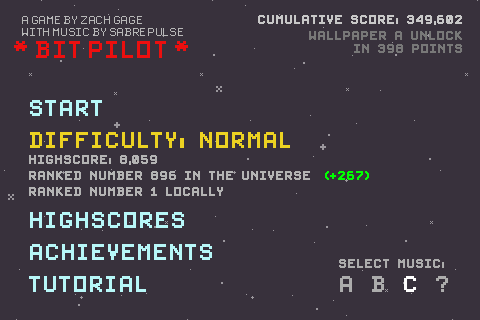
Bit Pilot is one of those new types of retro games. It's not a remake of a classic from the 70s or 80s, but it looks as if it could have been. The premise is simple. You're in an asteroid field and you're supposed to navigate your little ship to avoid the rocks and collect medicine-looking things for points. That's it. That's the whole game. Pixelated graphics? Check. Awesome chiptunes? Check. Storyline? Nope.

You control your little dot of a ship by swiping in the appropriate direction with your thumb. To accelerate faster, you use both you left and right thumbs. This is necessary when you get to the higher levels and the rocks move much faster. Some of the medicine things add a layer of shields to your ship, allowing you to take more damage. Occasionally a big laser beam comes and covers the whole horizontal length of the screen, so your reflexes are important.

As mentioned in my Tilt to Live review, these kinds of simple games that you can pick up for a few minutes to go for a high score are tremendously ideal for the iPhone platform. And in spite of this simplicity, there remains a motivation to keep playing. The game records your total score across all plays, and at certain point totals another song is unlocked, allowing you to listen to said song while playing. When you unlock all 3 songs, your next goal is to unlock iPhone wallpapers. Your single-game scores in both Easy and Normal modes are also posted to the online, OpenFeint-enabled leaderboards so you can see how you're doing against others in the world (though the game claims that you're being compared to the rest of the galaxy).

For $1, I'd recommend it for sure, especially if you like chiptunes.

Old-school title screen ftw?

I died shortly after taking this screenshot.

Wallpaper A unlocked!

Game Review - Tilt to Live

Tilt to Live - $2.99 (Appshopper link)

Many have attempted to bring big budget, full-featured games from consoles and computers to the portable, small-screened iPhone. Some games turn out well, but many of them suffer from the small screen and the lack of physical buttons. This is why certain types of games really excel on the iPhone and others don't.

Tilt to Live is an example of a simple game that really takes advantage of what the iPhone can do, while not trying to do something that the iPhone can't do. But don't let the term "simple" fool you.

With that out of the way, here's what the game is about. You control what is basically a white arrow on a rectangular playing field the size of your iDevice's screen. In gamer lingo, it's a 2-D overhead view game. Red dots appear on the screen and constantly try to kill you by touching you. Your goal is to use the iPhone's tilt controls to move the white arrow and avoid the red dots - hence the name 'Tilt to Live'.

But it's not just a survival and avoidance game. Along with the red dot enemies, weapons appear randomly which you can use to destroy the dots. There are eight weapons in all, and three of them - nuke, hadouken (my name, not theirs), and homing missiles - are available from the beginning. As you play the game and achieve certain feats, you gain Agon points. At certain Agon point levels you unlock new weapons. Achieving these feats is half the fun, and obtaining and using the new weapons is the other half of the fun. Eventually you get a freeze blast, detonating shield, spiked shield, lightning shield, and finally the "burnicade" which creates a temporary fiery wall that kills any red dots that come in contact.

Tilt to Live is a great twist on the "survive as long as you can and try for the high score" type of game. Even though you may die quickly at first, there is always an incentive to try again, whether it's to get a better score or to unlock the newest achievement/weapon.

But wait, there's more! What I described above is just one of 4 play modes in Tilt to Live, the Normal mode. Also included is Code Red, the "Normal game, but on crack," where red dots show up much faster and are many times more relentless. There's Gauntlet, in which you get no weapons and red dots are arranged in a side-scrolling "obstacle course" of sorts and you must avoid them and collect Time orbs to increase the time left on the figurative hourglass. And finally there's the newest mode, Frostbite, in which red dots start out frozen and continuously fall downward from the top of the screen. You must touch them to pop them before they reach the bottom, at which point they thaw out and come after you.

If you're looking for a game that can be either a quick time killer or something to keep you occupied on a long flight, give Tilt to Live a try.

The loading screen is always entertaining.

350 Agon points is more than enough to get all the weapons.

Choose your destiny

Red Alert!

We need a burnicade in here, stat!

Game Review - MiniSquadron

MiniSquadron - $2.99 (Appshopper link)

MiniSquadron SE - Free + DLC (Appshopper link)

Every time I do a game review I grapple with the problem of what to mention and what not to mention. If I go into too much detail, I risk making the reader feel lost because he or she hasn't played the game yet. There's so much about MiniSquadron and its followup that it's hard to cover all of it without being too long-winded or overly detailed. So this time I shall endeavor to do this review in fewer than 8 paragraphs.

MiniSquadron is a great "pick up and play" game that you can turn on when you have a few minutes to kill, yet has a ton of neat things that will keep you coming back for more on your next break. You control an airplane, and your goal is to destroy all the other planes that show up in order to advance to the next wave. Visually, MiniSquadron is a cartoony 2-D side-view game with colorful and varied settings. Each area, which features 12 waves of enemies, has a unique theme, such as Face Land, whose background is littered with Moai heads from Easter Island, or Sunset Lagoon, which has a brilliant red-orange backdrop.

Like many other wave-based games, your goal is to survive 12 waves in each area and get the highest score possible. What's neat about the scoring though, is that you're not trying for a high score just to get a high score. There are certain goals to meet, and if you meet them, you unlock new planes. For example, a particular plane may be unlocked if you get 30,000 pts by the time you finish Wave 5 in Face Land. There are 56 different planes in all, and each has its strengths, weaknesses, and quirks.

Each plane also has a certain weapon type. There are 7 weapon types in all: Cannon (your standard bullets), Double Cannon, Triple Cannon, Homing Missile, Cluster Bomb, Drop Bomb, and Laser. Dividing 56 by 7, you get 8, meaning that 8 planes have a cannon, 8 planes have a double cannon, 8 planes have a laser, and so on. But not all planes are the same, even if they have the same weapon. Some may be faster but have weaker armor so you die faster. Others may be slow-moving and not very quick to turn, but have near-impenetrable armor. Finally, most of the ships have interesting and/or funny names that the creators, Studio FungFung, obviously had a lot of fun thinking up.

To make things even more interesting, powerups fall from the sky in the form of different colored stars. Powerups can make you faster, slower, invincible, invisible, shoot a burst of homing missiles, call in an airstrike, shoot a ginormous laser, or just give you extra points. Sometimes a Heart will appear, giving you an extra life. The kicker is that these hearts and stars can also be taken by enemy planes. The heart doesn't do anything for enemies, but the other powerups do, and you'll be at a disadvantage if, say, the enemy gets the Airstrike power.

I played MiniSquadron like crazy and managed to unlock all planes except the last one, which requires completing the last wave of the last area with a crazy high score. I haven't been able to complete it at all, much less get the high score. I will someday, though.

MiniSquadron is currently $2.99, and if you have half as much fun as I did, it's worth it. If you're not sure, you can download MiniSquadron SE, which contains the first 2 levels for free, and the other 6 as 3 separate $.99 download packs. I should note that MiniSquadron SE is a different game, with a new set of 56 planes and all-new areas, weapons, and powerups.

There! 8 paragraphs! For a buttload of screenshots, visit my Picasa web album.

Saturday, March 13, 2010

Game Review - Eyegore's Eye Blast

Review - Eyegore's Eye Blast - $1.99 (free version available) (Appshopper Link)

One of the great things about the App Store and the games in it is the propensity for its developers to take a formula that works and use the special capabilities of the iPhone/iPod touch to add something very cool and interesting. In some cases, it has to do with touch controls being more precise than moving a pointer around on the screen with a mouse or arrow keys. In the case of Eyegore's Eyeblast, it has to do with using the device's accelerometer to inject some innovation into the good old Bust-a-Move/Puzzle Bobble formula.

For those who were deprived, Bust-a-Move was an old Super Nintendo/arcade game where your goal is to shoot a colored orb from the bottom of the screen at a group of orbs at the top of the screen to make them disappear. Your ability to estimate angles and vectors was key, because the orbs were shot out of something resembling a rotating turret.

Eyegore's Eyeblast takes that tried and true system one step further. Instead of being stationary at the top of the screen as in Bust-a-Move, the orbs in Eyegore's Eye Blast are suspended on a chain, and using the accelerometer (i.e. tilt controls), you can move the chain and orbs as if they were a big pendulum. This introduces an extra element of strategy, because you now have a tremendous amount of control over where your shot lands. For example, if you're aiming for a red orb at the top of the bunch, inaccessible to direct shots, you have to slowly tilt your device from side to side, gathering up enough momentum for the pendulum, and with the right timing, ricochet your shot off the side and top walls to get to the that red orb on top while it's exposed.

It's really a lot of fun, and I think those who enjoy the challenge of playing billiards will appreciate this pocket-sized puzzler. Oh and by the way, instead of being colored orbs, the things in Eyegore's Eyeblast are EYEBALLS!!! Eyegore's Eyeblast is connected to the Agon Online network, which tracks global scores and records your achievements for accomplishing special goals in-game.

If you're curious, at least check out the Lite version (link above).


Game Review - Samurai: Way of the Warrior

Review - Samurai: Way of the Warrior - $1.99 (free version available) (Appshopper link)

One of the things iPhone game developers have to contend with when designing controls for a game is the lack of physical control buttons, like a game console or other portable like the Sony PSP and Nintendo DS. Since the beginning of iPhone games, many creative control schemes have surfaced to compensate for this. Some have been great and intuitive and others have proven clunky at best.

Samurai: Way of the Sword is mostly in the first category. You control an honorable Samurai warrior, who arrives in a town and finds that it has been taken over by a brutal, powerhungry warlord and thus is crawling with his lackeys. Samurai is an action game, primarily consisting of you moving around and using your swordsmanship to wipe out waves of enemies as you move through the towns.

And that's where the controls come in. You simply tap on the screen where you want the guy to walk to. To attack or dodge, you swipe your finger up, left, or right on the screen. As you play, you will "unlock" various combo moves that consist of repeated swipe combinations (such as Left, Up, Left).

As simple and intuitive as these controls are, however, I have found Samurai to be the touchscreen controlled version of a "button masher", where it really doesn't matter which way you swipe or which combos you use - I just ended up going nuts swiping in every direction. I don't know if this is due to my impatience or the inability to tell the difference between all the different combos I was supposedly performing. Still, the cartoon brushstroke visuals and cheesy yet gory enemy deaths are worth a look if you like simple action games.

I would kind of see myself enjoying this game as more of a "play for 5 minutes while waiting in line" type of game rather than something to get sucked into for hours. I have not finished the game yet, but it feels like it can get repetitive pretty quickly.

Look at the screenshots below and check out the free version (link at the top of this post).


Sunday, February 28, 2010

Game Review - Alchemize

Review - Alchemize - $2.99 (AppShopper Link)

The puzzle game genre has been around a very long time - since the early days of video games, really. The first one that comes to mind is Tetris, in which falling blocks fit together to make rows disappear. Since then, thousands of other games have paid homage to it or otherwise tweaked the formula to make things a little different and a little more interesting. A recent entry in the long line of puzzle games on the iPod touch and iPhone is "Alchemize", a game that, like those that came before it, involves matching 3 or more objects with the same color/symbol to make them disappear, give you points, and get to the next level.

Alchemize has an interesting twist on the tried and true (or overplayed?) match-3 formula. Instead of the items simply disappearing when matched, they transform into one item of a different color/symbol. For example, matching three or more green flasks yields one yellow bottle. And, as the game's name suggests, the ultimate goal is to create gold. I haven't gotten far enough in the game to find the item that transforms to gold, but I'm sure I'll feel like an accomplished alchemist when I do.

Alchemize has several game modes, of which I've only played two. In Classic mode you have unlimited time to relax and match those flasks, bottles, and goblets at your leisure. The game ends when the screen fills up with unmatched items or when you create gold. In Action mode, you have a limited amount of time to do each move. More time is given for each match, but no time is given for simply dropping items w/o making matches. It's pretty frantic.

All in all, Alchemize is very intriguing and should be a lot of fun for fans of casual puzzle gaming. I'm not in that camp, but I can't deny that these kinds of games are the best for short bursts of gaming when you're on the go or waiting in line for something.

There's also a free Mini version that you can try before you buy.


Sunday, January 17, 2010

Rogue Planet - Free

I've always been a fan of real time strategy (RTS) games and turn-based strategy games. The problem is, I suck at them. So normally I ignore them. This is why you may have noticed they were conspicuously missing from my list of top 15 games of the decade. However, I was drawn to Rogue Planet as soon as I saw screenshots of it. The beauty of the App Store, of course, is that lite versions allow you to try before you buy, lest you get fooled by pretty graphics.

Rogue Planet is a turn-based strategy game, and like others of its ilk, you take control of several units to attack the enemy or to protect allies. Different units have their own strengths and weaknesses, and you need to use those, as well as the terrain, to your advantage.

Oh, and there's a pretty neat storyline, of which I'm going to spoil the beginning a little bit. You are an officer aboard the colony ship Nimah, which is returning to Earth after years in space. But as the Nimah approaches Earth, no radio signals are detected on the surface, so the captain decides to investigate. But the Nimah is attacked, and the engineering crew is killed. The ship is forced to land to assess the situation and attempt repairs, and it's your job to defend the ship from an unfamiliar enemy.

What impresses me the most about this game is its visual style and theme. The menus, conversation screens, and backdrops have a well-detailed futuristic look. Everything moves very smoothly, even on a lowly first-generation iPod touch.

I completed the single mission included with the Free version of the game, and I'd say it was time well-spent. Based solely on this free demo, I would recommend the full version to fans of turn-based strategy and science fiction. At $4.99, however, it is in the medium portion of the App Store's price spectrum for games, so try the Free version first. If there's a decent price drop or sale, I will probably pick it up.


Cartoon Wars - Early Impressions

I came across this game called Cartoon Wars when looking for new iPod touch games to play. It's a "castle defense" game with a hand-drawn stick figure style to it. You start out with your castle, which has a giant crossbow attached to it, and the ability to train warriors, your basic fighting units. The opposing castle is at the opposite end of the screen, which you can view by scrolling with your finger. As you defeat the constant stream of enemies emerging from the other castle you earn gold, which you can spend on upgrades to your Warriors or to obtain the ability to train different, more powerful (but more expensive) units. Gold can also be spent to upgrade your castle or improve the artillery.

I haven't gotten very far in this game, and the goal of destroying the opposing castle seems tougher than I'd like it, considering how weak your warriors start out and how strong their attackers are. The best I've achieved is a stalemate. Apparently you reach the next level each time you destroy the opponent's castle, and the game saves itself. I haven't gotten that far, so I've had to start over from the beginning each time I've played it.

Cartoon Wars is a great concept, but the controls for aiming the crossbow are a bit laggy and the lack of a Save feature in the middle of the level is quite annoying. Nevertheless, you may have more luck (or skill) with this game than I, so at $0.99 if you're interested, I'd say go for it. There's also a free Lite version available, and a followup called Cartoon Wars Gunner, which seems to be a totally different type of game.


Friday, August 28, 2009

Facebook 3.0 for iPhone/iPod Touch

Blog posts that get imported to Facebook get truncated. If you're viewing this in Facebook on your computer, click View Original Post or just go to omnigeno.blogspot.com.

Most of us who have iPhones or iPod touches also use the Facebook application for iPhone. Well, yesterday, the folks at Facebook released a totally retooled version of the iPhone app, bringing much more features and improved usability (in my opinion, anyway). I've only used it for about an hour so I'm not sure that I've found all the changes. But here is a list of the changes and feature additions that I've noticed.

Note: Delete the app and reinstall if it doesn't work for you after the update. Don't worry, it's still free.

-Layout of "home" page. There is now a "home" page similar to your "Home" screen on your iPhone/iPod touch. It allows quick access to your nine main features: News feed, Profile, Friends, Inbox, Chat, Requests, Events, Photos, and Notes.
-That's right, you can now read and write Notes from the iPhone app. Text is copyable in notes. You cannot, however, view pictures or comments in notes. Watch out for imported, truncated notes. Notes imported from an external blog, such as this one, get truncated, and unlike the desktop browser version of Facebook, there's no like to "Show Original Post" in the Facebook app.
-Can now view "fan" pages. Access them by touching "Friends" and then tapping the Pages tab at the bottom of the screen.
-Can now "like" things AND view existing likes. The previous version of the app was not designed to support either of these.
-There is now a separate button for adding comments and viewing existing comments, although you can still add a comment while viewing them.
-Friends' info pages now can list their friends, the friends they have in common with you, and the "fan" pages to which they're subscribed.
-For links/photos, you must now touch the link text or actual photo instead of just somewhere in the "box". This is kind of hard to explain - you have to see it to understand.
-Can now pinch-zoom photos like in every other iPhone app.
-Refined News Feed filter. Remember before there was this strange scrolling bar near the top of your news feed to filter it to show only certain entries? Now it's just an unobtrusive button that you press to bring up an iPhone-style menu. Neat.
-Can now add shortcuts to pages in main interface, sort of like the iPhone Home screen.
-All pages but Home now available in landscape mode.
-Typing *seems* less laggy (unconfirmed)
-Now has built in browser for unsupported pages such as Facebook apps (mafia wars, superpoke) or external sites. The option to view in normal Safari is there with the push of a button.

There's probably way more that I missed, but that's all I've got for now. Overall, a very nice update that brings it much closer to the functionality of the full desktop browser version of Facebook. Kudos to them.

Thursday, August 27, 2009

Classy Yelp

So I was just checking out the Yelp application for iPhone/iPod Touch on my iPod. I typically don't use it, because without a persistent internet connection while on the go, it's really of no use to me. But I was bored while waiting for something, so I checked out reviews for restaurants near me.

One neat feature of this Yelp app is that it has a button on the business' page to call them from within the app. Well, being on an iPod Touch, I wanted to see what would happen if I pressed that button.

I gotta say, they were really classy about it. If I were the dev, I probably would've said something snarky like "No, you moron. Why are you trying to make a phone call with an iPod?"

But then again, people very often ask me to do things with my iPod touch that only the iPhone can do, assuming it's an iPhone... like when we're on the road, "look up the map to see where we are" or "Can I borrow your phone?" while pointing to my iPod. Yeah, I wish I could do those things, but I can't. So stop asking and making me feel bad.

Yes, the Yelp app told me what I already knew, but I think it was a nice touch. That dialog box is better than, say, doing nothing at all. The only thing that would've made it better would be if it pretended to make a call and then say "Haha, just kidding."

Wednesday, August 26, 2009

Post #100!

Well, since it's very, very likely that no one is as excited about this as I am, for good reason, I'm not going to dwell on the fact that this is my 100th post on this blog.

I'm really here to write a little about creative uses of the iPhone I came across. For a while now, musicians have been putting out apps to promote their music. They've had interesting ideas too.

Death Cab for Cutie, for example, has a Death Cab app that provides in-app music and video streaming, including 9 songs that you can listen to (when you have an internet connection). Lyrics, album art, tour dates, and photos are also included. For sure, this stuff is mostly for people who are already fans, but it's nice of them to give these freebies out.

The band Nine Inch Nails has an app called "nin: access," which has a rather interesting community aspect to it. From the app description:

- Engage in location-based conversation and share photos with other NIN fans around the world.
- Access the latest NIN news and blog updates.

- Listen to a variety of streaming NIN music, including exclusive playlists and thousands of fan-created remixes.

- View, save, and share images and videos from nin.com’s vast fan-supported media archive.

- Get exclusive free wallpaper images formatted for iPhone & iPod Touch.
- Access to nin.com’s thriving forums.

- Login with your free nin.com account, or create a new one directly from the app.

- Send & receive private messages and view user profiles.

True, this stuff is mainly for marketing purposes but I think it's a fantastic way to keep the fans more involved while on the go. It provides a level of interactivity I haven't seen before in the realm of cell phone and fandom. I'm not a fan of NIN, but if I were, I'd probably love this app.


Finally, the oddest one I've seen is the Coldplay app, designed around their new single Strawberry Swing. Like the other apps, it requires an internet connection even to open the app, and once in, requires a connection to receive ads (hey, how else do you think this thing is free?), stream the Strawberry Swing music video, and submit your high scores.

That's right, there's a game. But not just one game: three games. Marketing at its craziest. See, in the video, the main guy (presumably frontman Chris Martin) is some kind of Superman-esque superhero, flying through the sky, swimming through dangerous waters, and walking through the clouds to rescue the "Princess" from the diabolical Squirrel King. It's really a really neat, artsy video, and I'd recommend checking it out if you haven't. Well, that cartoony edge to the video really lends itself to cheap promotional video game creation.

All three games are locked when you first get the app. Once you watch the music video, the first game is unlocked. Playing through the first game once unlocks the second game, and one playthrough of the second game unlocks the third. The first game is a clone of just about every game that came out when the iPhone app store first opened: you tilt your device left or right to move the guy, flying through the air, avoiding biplanes and collecting stars and umbrellas. At the end of the stage, you have to dodge the Squirrel King's arrows.

In the second game you're swimming under water. Once again you tilt the device to move him up, down, left, or right, collecting stars and keys (same as umbrellas, to be honest) and avoiding junk that has fallen into the ocean, like hat racks and dressers (yeah, hat racks).

The third game is a side scrolling platformer where you (yup, you guessed it) collect stars. But also there are skeletons. You jump on their heads and they fall apart, allowing you to pick up the skull to use as a weapon on the next skeleton that comes along.

The app is free, but if you believe that Time is Money, then the time I spent playing these cheap promo tricks is probably worth more to me than the "nothing" that I paid for this app. In other words, try it out if you're curious, but all the while keep in mind that you're not really supposed to be having fun while playing. Instead, you're supposed to be wanting to buy the music video on iTunes, or better yet, buy the album that Strawberry Swing is on.

Saturday, August 15, 2009

Quick Time Waster

Paper Toss, Free (App Store, AppShopper.com)

As amazingly detailed and in-depth iPhone/iPod touch games have become these days, the fact remains that it is still a mobile platform. And when people have a lot of time to spend playing a game, they're probably going to be spending it on their computer or on whatever version of Playstation, XBox, or Nintendo system they have. Therefore, the best model for an iPhone/iPod touch game is one that is simple and one that you can pick up real quickly and put down at a moment's notice. Many in-depth games (like Zombieville USA and Virtual Villagers) have the nice autosave-on-exit feature so you can pick up right where you left off.

Paper Toss is not the kind of game that really needs that, because its premise is as simple as it gets. You have a metric buttload of crumpled papers, which you presumably created while bored at work. The objective is simple: throw the crumpled paper balls into the trash can by flicking your finger upwards on the screen. The one catch is that a fan is randomly blowing left or right, affecting the trajectory of your paper projectile. So you need to compensate for this.

That's it! The game keeps track of your current score and latest high score and there are three difficulty levels. The game takes place in some kind of office, and there's a bonus Easy level located at an airport, in honor of the release of their paid "sequel," Paper Toss World Tour.

If you have a few minutes (or even seconds) where you're waiting for a printout or something, download Paper Toss (again, it's free) and dispose of some hapless papers.

And yes, that guy on the Backflip Studios logo is creepy for some reason...


Saturday, June 13, 2009

Not creepy, but tons of fun

The Creeps! $0.99 In-depth review

I have to admit it.  I'm finally getting tired of Tower Defense games.  I did a review and strategy feature on a few of them several months back, and since then I really haven't played much.  That is, except The Creeps!  Now, I'm not yelling at you.  The exclamation point is actually part of the name.

What's so different about The Creeps! that gives it such longevity?  Well, several things.  Read on. If you saw my reviews of Tap Defense, Fieldrunners, and 7 Cities (post 1, post 2), you'll know that different companies are pretty good at developing new and interesting approaches to the same old (new?) tower defense genre.  Fieldrunners and 7 Cities both contained two game types: one that ends when you beat all the levels and one that keeps on going until you lose all your lives.  The Creeps! does one better: it has 3 gameplay modes!  Okay, now I am yelling at you.  But let's go back a bit and talk about the game itself.

The Creeps! is a tower defense game.  And like all other tower defense games, you have enemies moving along the screen attempting to get to a goal.  You place towers, which cost money and come in different varies, to destroy your enemies before they get through.  If you let too many enemies get through, you lose.  Simple.

In The Creeps! you are the intrepid defender of... this little kid's bed.  He's creeped out because there are monsters literally coming out of his closet to get him.  Yeah, I'd be scared too.  The monsters move on a set path to the bed, where the kid's head is poking in and out from under his covers.  A recent update to The Creeps! from its creator, Super Squawk Software, adds some new towers and maps, adding to the longevity.  Now there are several graveyard maps, Mars maps, and undersea maps.

Regular maps can be played in Survival Mode, where you play a map for a certain number of waves and then you're done.  They can also be played in Endurance Mode, where you play an unending number of waves... well, unending until you die of course.  I'll get to the third mode in a bit.

The cool thing about The Creeps! is something I hadn't seen in any previous tower defense game: the ability to target certain enemies.  When it gets crazy, sometimes it's good to be able to tell your towers who to fire on, especially when one monster is just about go get to his goal.  With other games, you just have to rely on the game's A.I. to decide who your towers want to kill.  But that's not all.  The Creeps! features other inanimate objects that sit on the map that you can target with your towers.  There is some delay time in between waves of monsters that you can spend to get extra points and money from destroying these random objects.  They include trees, headstones, rocks, coral, and other stuff.  When these obstructions are destroyed, you can build towers in their place.  In harder levels, this adds an extra element of strategy in that you cannot win w/o clearing out most or all of these objects - there simply would not be any room to place your towers otherwise.

The above is especially important in the new and cool mode that Super Squawk added in the newest update.  It's called Doorbuster Mode.  As I said before, enemies come from the possessed closet door and move along a path to get to the kid's bed.  In Doorbuster Mode, your main goal, aside from destroying enemies, is to destroy the door from which they come.  The door takes a long time to destroy, so you need to get your hits in in between waves of enemies, and you need to upgrade your towers accordingly.  In some doorbuster maps, you cannot even place a tower close enough to reach the door until you've destroyed enough inanimate map objects.  Lots of fun.

I've written this much and haven't even talked about the enemies and the weapons!  I'll go through those really quickly.  The enemies as well as all the surroundings are really cartoony and colorfully drawn.  The game is fun to look at, really.  In the Mars and Graveyard maps (of which there are plenty), enemies include ghosts, zombies, vampires, mummies, and other horror film staples.  The sound effects, especially the sounds the enemies make when they die, are superb and hilarious.  I especially like the vampires saying "Ow, zat hurts!"  You really have to hear it for yourself.  In the underwater maps, you encounter creatures like sea urchins, eels, crabs, tiny whales, and snail-like things.  In all maps, every once in a while you'll run into bosses, which are simply larger versions of the regular enemies.

The towers really go along with the cartoony theme of the game.  Your main weapon is a toy ray gun that shoots blue laser beams.  There is also a boomerang, which homes in on enemies and causes explosion/splash damage.  The tower I like a lot from a creative and stylistic standpoint is the glue bottle, which is this game's version of the "goo tower" that slows enemies down.  I mean, it's a freaking bottle of glue!  How cool is that? Anyway, we also have a flashlight, which is kind of like a lightning/tesla tower, and a paper ninja star.  Ooh, those paper cuts hurt.  All regular towers can be upgraded up to a third level, which makes them faster and do more damage.

There are also super towers that work for a limited time only before needing to recharge.  These include a UFO that does massive damage to whoever it's hovering over, a giant black widow that does super glue effects, a tornado that can carry enemies backward or just keep them in one place for an easy kill, and an oil can that allows you to muck up the path that enemies travel along.  All these super towers cost a lot of money but can really be game changers. They also make use of the iPod touch or iPhone's accelerometer.  You tilt your device to control their direction.

The Creeps! is good enough for me to ramble on and on about it in this post, and at $0.99 it's really a no-brainer for anyone interested in Tower Defense.  If you didn't think the others were for you, you may want to reconsider and try this one out.  I believe there is also a Lite version.


Saturday, May 16, 2009

Stupid iPod Touch tricks

When you first get your iPod Touch you are blown away by the slick interface and all the neat features that you now can't do without. It's chock full of features, though some of them might not be very obvious. Some are in the instructions (which I rarely read, and I'm not sure that you do either) and others are not.

1) Music controls anywhere: a neat thing about the iPod Touch is that you can use other programs besides the music player while you are listening to your music. This is easily done by getting your music started and then pressing the Home button to return to the Home screen. From there you can choose whatever app you want to use - Mail, Safari, and even games that support you providing your own music. But what if you're using that app and you run into a song you don't feel like listening to? Double-tap the home button real fast. This'll bring up the music controls wherever you are, allowing you to pause, skip forward, or skip backwards. Tapping the Close button will dismiss the controls and return you to your regularly scheduled app, or touching the Music button will quit your current app and bring up the full fledged Music player app. The only downfall to this feature is that if you don't double click the Home button fast enough, or if you give it 3 clicks instead, it behaves as if you pressed it once, returning you to the Home screen.

1a) The double-tap feature also works if you're at the "Slide to unlock" screen.

1b) Sometimes apps (usually games) support you playing your own music but by default will silence your music upon startup and play its own music instead. To get around this, double tap the Home button while in the game and press Play. This will silence the in-game audio and resume your music instead in most (but not all) apps.

2) Screenshot: This is self-explanatory, but it's a real killer feature. Say you have something cool or hot on your screen and you want to save it for posterity (or at least to show your friends). You can save an exact picture of what you're seeing in your Photo library. Keep in mind that you have to be fairly quick about this. While holding the Sleep button, press and release the Home button, and then immediately release the Sleep button. The screen will flash white and you'll hear a camera sound. The iPod touch doesn't have a camera on it like its older sibling the iPhone, but you can still capture memories on it.

3) Auto-Pause: Say you're listening to something on your headphones and someone important walks up. You want to pause the audio because you don't want to miss the rest (as is often the case with audiobooks and podcasts) but you can't be bothered to quickly bring up the audio controls (either in the Music app or via the trick in #1). All you have to do is quickly unplug your headphones. You'll notice that the audio automagically pauses itself, because it knows you're not listening anymore. Sweet. When you plug your headphones back in, it doesn't resume automatically, which makes sense because while unplugged headphones = not listening, plugged-in headphones does not necessarily = you have the headphones on your ears. Bring the audio controls back up to resume listening.

4) Rearranging/deleting apps: tap and hold on any app's icon on the home screen until everything starts jiggling. Yes, that's right, jiggling. You'll notice that all the third-party apps will also now have "x" buttons on them, allowing you to delete them from your iDevice. Also in this mode you can tap-drag icons to arrange them to your heart's content. Remember that the bottommost row holds apps that are shown no matter what page you're on, so keep the most frequently used apps down there. Press the Home button to exit Jiggly Mode.

5) Quicker page changing: Once you get enough apps to fill several pages (believe me, this will happen pretty soon with all the free apps available), you may find yourself swiping your finger across the screen over and over to switch between pages. There is a little invisible area to the right and to the left of the "page indicators" at the bottom (the white and gray dots) where if you simply tap, it'll change the page. So if you tap just to the right of the page indicators, it'll go to the next page, and if you tap to the left of them, it'll go to the previous page. Also, if you're on any page other than page 1, pressing the Home button will return you to page 1. Handy if you have more than 2 pages of apps.

6) Battery saver: The killer feature of the iPod touch in my opinion is the wifi. Even when not connected to an access point, however, the wifi drains battery. If you go to your Settings app you can disable your wifi. I highly recommend doing this while not using wifi - for example, when you're driving somewhere, so it doesn't keep draining battery looking for access points. Turn it back on when you know you're going to use it.

6a) Auto-brightness: Along the same lines, you can find the Brightness setting in your Settings app. Nothing too fancy. You can adjust the brightness. Turn it down in dim lighting, and turn it all the way up in bright lighting. The interesting feature here is "Auto-Brightness" which uses the light sensor located near the top of the iPod's face. This feature can also help to save battery by sensing the light level in the room.

All of these tricks also work with the iPhone.

Tune in next time for some app recommendations and some more neat features.

Saturday, April 4, 2009

Litely Puzzling

Puzzle Prism Lite

I'm just on a freaking roll. Anyone who likes Tetris will like Puzzle Prism. It's sort of a 3-D Tetris type game. You have different-shaped falling blocks that need to be fit together in order to make rows disappear. But since it's in 3-D, the rows are more like "sheets." From the top, it looks like a 2x2 grid.

There are three control schemes, two of which place buttons on the screen to rotate and drop your current piece. But the default control scheme is the best. You flick your finger right to rotate counter clockwise, left to rotate the piece clockwise, and down to drop the piece. There really isn't much else to say about this game. I've only played the free Lite version of the game, which has a single game mode: Time Trial. The full version has more game modes.

Puzzle Prism is a fun diversion that is great for pulling out to play when you're waiting for your overly greasy fast food lunch, or when you want to ignore your annoying coworkers. It's a win-win situation. Download the Lite version to try it, and buy the full version if you like it enough.


Sorry for all the scrolling. I can't figure out how to put two pictures on a single line.

App Store Link
App Store Link (Full Version) (on sale for $1.99 for a short time only)