Showing posts with label Apple Inc. Show all posts

Sunday, October 9, 2011

Steve

It's been four days and it's still hard to get my thoughts together. I think my mind still can't fathom that he's gone. He shaped my life and the lives of others in ways I never even thought about until now, despite us not knowing him personally.


That Steve Jobs changed the world is not an overstatement. In a personal sense, he is a big reason for me having such a great interest in computers and technology (the other reason being my dad). When I was a wee lad, my dad would bring his work computer home over holiday breaks. The computer was a Mac Plus, the black and white screened all-in-one that was a descendant of the original Macintosh. My dad used the computer to do work, but I sure had a heck of a lot of fun with it. My first exposure to computers had me instantly hooked. I loved everything from the oldschool startup chime to the intuitiveness of the Mac System 6 user interface.


But the true test is to ask whether I still would've been hooked if the computer had been a Windows PC. Ah, but that's a trick question, isn't it? Windows would not exist if it weren't for Steve and his Mac operating system. Don't believe me? Go watch Pirates of Silicon Valley, starring Noah Wyle and Anthony Michael Hall. Besides, back in those days Windows was pretty much nothing, and most non-Apple computers ran the useable but horribly unintuitive DOS. I am certain that if my first introduction to computers was DOS or Windows 1, 2, or 3.0, I would've been repelled. My preference, and my family's preference, has never wavered to this day. There has always been something about Apple's products that transcend price and specs that, if you haven't experienced them, you probably don't understand.


But the success and the impact of Apple and Steve Jobs, as well as my appreciation for them, goes beyond simple personal preferences and money. This is something that a lot of detractors seem to completely miss. Common refrains from the hater camp are that Apple claims to innovate but their successful products are ones that have been done already in the past. That Apple's unwavering adherence to their often draconian policies severely hurts the industry and hurts innovation. That Apple's marketing dangerously misleads people into believing their highly priced products can cure the common cold and create world peace. And that Apple doesn't even adhere to their own slogan "Think Different" because they make stuff that's been done before. Even a decade ago, many people held to the believe that Apple's products were just toys compared to their competition, and I even had one friend tell me "Macs are for people who can't afford PCs", which was so wrong in so many ways.


I will address these points individually, and in doing so attempt to explain why Steve's and Apple's accomplishments and contributions must be celebrated. First, people who think Apple just retreads what others have already done are not seeing the big picture. Sure, personal computers were around before the Mac, and MP3 players were around before the iPod, but who used personal computers back then? Only geeks who could stand to use a command line for doing anything besides listing directory contents. And who used MP3 players in their infancy? Well, I didn't know anyone, but I do know that they were hard to use and were mainly the domain of geeks who, again, could stand to get their own MP3s somehow and finagle them onto their clunky portable music player. But when the Mac came along in 1984, and when the iPod launched in 2001, it got regular people excited and regular people understood how to use these machines for the first time. Steve's power was the power to get normal people excited about things that they used to consider silly, complicated nerd paraphernalia. People tend to hate the iPod and the iTunes Store for being a closed ecosystem, but they forget that only Apple's stubbornness and cash could convince the entire RIAA to move into the 21st century in terms of selling their music online. And this is why we have Amazon MP3 and all the other online music stores.


The ultimate example of this, and more, is the iPhone. Before the iPhone was introduced in 2007, the term "smartphone" was synonymous with RIM's Blackberry phones, and to some extent, Palm's phones. And at the time these phones could do email, sure. They could do calendars, messaging, and get on the web. But the web on a mid-2000s smartphone was awful. Web sites were designed to run on browsers made for desktop and notebook computers, and thus when these primitive smartphone browsers attempted to connected them, all they got was some poorly formatted text version that was horrendously inconvenient to navigate. I have no doubt that without the iPhone, smartphones of 2011 would still bear those old stodgy, clunky designs and hundreds of millions of people would not be able to access so much good information in mere seconds, as these phones would still be the domain of businesspeople and rich geeks. Oh and no Android for you! So before you dismiss Apple as not having any original ideas of their own, think about that. Today's Windows computers would not exist, or they would suck way more than they do. Today's music industry would have collapsed due to their inability to adapt to the "digital age". And today's phones would still be clunky contraptions that everyone needs but no one likes to use.


The next issue is Apple's stubborn adherence to their own policies. The company under Steve was uncompromising, headstrong, and aggressive. It creates and enforces strict rules for the use of its operating systems (see Mac OSX and iOS) in the name of preventing dilution of the products and the brand. To this end Apple brings legal action against companies who make products Apple feels is copying them. Apple also has a history of rejecting or removing apps from its iOS app store that thinks violates the developer agreement. Recently the court upheld a ruling for a lawsuit Apple brought against Psystar, a small company that sold "Mac clones" - generic PC boxes that ran Mac OSX. Many see actions like this and others as anticompetitive and harmful to innovation. Perhaps some of them are anticompetitive, and in terms of US law these situations should probably be judged accordingly. But people should also understand the idea behind their actions. Steve (and by extension, Apple) sought to control all parts of their product because he wanted to make really, really great products that people would love. And to do so, he wanted to leave nothing to chance - "chance" being the possibility for someone outside of his control to screw that up. It's this uncompromising dedication to the end user experience that enables their products to be so sought after and valued. In other words, without the stubborn iron first guiding things, Apple's products would not stand out, and there is a very real possibility that no products in the markets Apple currently occupies would be highly desired by anybody. And because their products are so highly sought after, it lights fire under the asses of the likes of Microsoft, Google, Samsung, HTC, RIM, HP, and even Nintendo and the company that makes George Foreman grills. Those who consider the results of Apple's actions hurting innovation need to reexamine their definition of "hurting".


On the idea that Apple oversells its products, all I have to say is "don't you wish your company had the marketing juggernaut that Apple has?" Anyone who says no is a fool. The other side to the coin, however, is the idea of truth in advertising. I'm all for truth in advertising. The thing is, I think Apple actually tends to be more careful with facts than people give them credit for. It's never been about specs or numbers with Apple. It's always been about going after your emotions and grabbing you such that you feel like you "have to have it". The thing detractors don't understand is, when people see these commercials, and they consequently go out and buy the product, they are usually very satisfied with their purchase. Does that sound to you like dishonest marketing? Telling people (not necessarily in so many words) that they're going to love this product, and people buy it and they end up… loving the product? It's not about truth and lies, but about how the products make you feel. Oh, and by the way, they just happen to do what people expect them to do.


My day to day appreciation for what Steve has created at Apple is fairly mundane: I like how Mac OSX feels more than how Windows feels. And I like how iOS feels. These things are a matter of personal preference, and I would get nowhere trying to convince anyone that Apple's stuff is better than Microsoft's or Google's if they have their own strong feelings. But my goal was to examine how no matter whether one likes or hates Steve and Apple, it is a terrible, terrible mistake to discount their contribution to all facets of technology. Without Steve there would be no Windows. Without Steve there would be no Android. Without Steve the music industry would be a 20th century relic. Without Steve our smartphones would be dumb. Without Steve the world would be a world of boring beige boxes that only schools and businesses would bother to use. And without Steve we'd all still be using Parallel and PS/2 ports on our PCs. Steve's stubborn attention to the most minute detail in every aspect of design has made an amazing impact on how we define our aesthetics in technology today.


It has been said that Steve knew what you wanted even if you didn't know that you wanted it. It's so true, and it's been proven time and again, with the iPhone and the iPad. Now that he's gone, who will make us better devices, and who will make us love our technology?


For more reading or viewing, check out the links below:

Godfather of fonts article

Tribute by Leo Laporte et. al at TWiT TV

Think Different video on Youtube

Sunday, January 16, 2011

Crazy iPhone 5 Prediction

If you haven't been living under a rock, you probably know that this past week Verizon announced that iPhone 4 (or iPhone in general) is finally going to be available on Verizon's network. Once the excitement wore off, I got to thinking. Actually, I started thinking this several weeks before the announcement, since the rumor mill had been reaching a fever pitch, and I was skeptical.

So as you probably know, up until now there has always been a new iPhone released every summer. That is, in the US, there has always been a new iPhone on AT&T's GSM data network every summer. And since the GSM iPhone 4 came out on AT&T's network last summer, it would logically follow that the iPhone 5 (or whatever Apple decides to call it) will be released for AT&T customers this summer.

But where does that leave Verizon? iPhone 4 is going to be released on Verizon's CDMA network on Feburary 10, a full 7 months after iPhone 4 debuted on AT&T's service. If Apple keeps their release schedule on Verizon similar to AT&T's, that means that iPhone 5 will come to AT&T this summer, while Verizon will have to wait until February 2012 to get the iPhone 5. This makes absolutely no sense.

So here's my wild theory, based on absolutely no real evidence.

CDMA iPhone 4 comes out on February 10 on Verizon as planned. Then, in the Spring, the white iPhone 4 will not come out, despite what Apple said last October. In June, Apple will announce a simple iPhone refresh, probably still called iPhone 4 or something. In this refreshed iPhone 4, Apple will nix the 16GB version and lower the price of the 32GB version by $100. They will also introduce a 64GB model, a first for iPhones. The A4 processors in these iPhones will also receive a minor speed boost. And finally, these new iPhones will be sporting a new hybrid CDMA/GSM cellular chip, which will make it so that the phones work on any carriers' networks, but unfortunately will only see wide usage for a year. This is because in summer 2012, an LTE-based iPhone 5 will be released on both Verizon and AT&T.

Friday, June 4, 2010

Help me with a quick iPhone usage survey... and win!

This is a pretty crappy topic to make my first post in a long time, but I have to do this now. As you have probably heard, AT&T is changing their data plan for new smartphone customers.

The current plan is $30/month for "unlimited data", which is their way of saying 5GB max.

Now, as of June 7, 2010, new customers are subject to a tiered system, with the following:
- $15/month for 200MB
- $25/month for 2GB.

Now, you may have your strong feelings about this shift, and I have my opinions as well, but that is not the purpose of this post. I'm inviting you to help me in my quest to figure out how the new data plan will affect me, a prospective iPhone buyer/AT&T customer. Will I consistently go over the 2GB limit and have to pay their $10/GB overage fee?

If you'd like to participate, please answer the following two questions:

1) what kind of user do you consider yourself? Do you listen to a lot of streaming music or videos (Youtube, etc) on your iPhone? Are you always surfing the web/using apps, or are you a light user who goes on it once a day?

2) How much data do you use? This can be found by following the instructions in this Macrumors post. I would like to know at least how many MB or GB you used last month, though info on your usage for the last few months would be even better.

Notes:
- Please post your answers in the comments section below. If you are unable or unwilling to do so, you can send your response to omnigeno @ gmail.com (remove the spaces).
- I don't need to know how many SMS messages (texts) you've sent/received or how many minutes you've used for phone calls. Just data, please.
- Anyone who replies to both questions satisfactorily will be entered to win a $25 iTunes gift card code from me as a token of gratitude.

Thank you so much!

Friday, August 28, 2009

Mac or PC?

No preface here. Just going to jump right in. This is in reply to Naomi's question.

Here's an unbiased answer from a Mac user.

It comes down to a few things.

In my personal experience and in the experiences of my friends and relatives, price does not equal value. Yes, the upfront price of a Windows machine is less than than of a Mac, but are you getting more for your money? Macs, especially the current line of Macbook Pro laptops, are more sturdy and well-built than any other computer I've seen. Are you going to get good customer service in case something goes wrong? There are so many configurations of PCs that it's often hard for third-party tech support to help, and good luck getting quality support from the Dells of the world (Please see laptop tech support Showdown, Aug 5, 2009: http://www.laptopmag.com/mobile-life/tech-support-showdown-2009.aspx?page=1). With a Mac, you know you're going to get help from a local Apple Store because Apple made the thing. I've even heard of Apple replacing things out of warranty if you ask nicely enough.

Speaking of support and problems, when you get a Windows PC, you get immediate access to all the latest and greatest... malware. With the rise in popularity of Macs, I do foresee some bad stuff being written for them just out of spite. But I don't see that happening for some time. Macs have always been more secure, and in my 15+ years of using them, I've never run an antivirus - though I probably should in order not to infect my PC using friends. Now, people will tell you that they've run Windows for years without problems. And I believe them. But sometimes even the most security conscious PC users get bitten sometimes. Do you want to deal with this? If time is money, add the time spent checking for and removing malware to the nominally lower cost of a Windows PC. Better deal? Hmm...

And maybe your question isn't whether you want to deal with Windows security issues or not. The next question is what you're going to do with the computer. Unless you're using some specialized program (or games), Windows or Mac OSX will both be fine. Things like MS Office are on both, though I'm beginning to realize that I really didn't need Office all these years just to write essays, as there are free alternatives (Wordpad on Windows and TextEdit on Mac; OpenOffice on both). For gamers, there's no question Windows is the way to go. Some financial applications and business apps require Windows. If you're just going to use the computer casually, there's no reason you "need" Windows, but then again there's no reason you "need" Mac OSX either. Also take a look at what software would come on your PC laptop and what comes on a Macbook Pro that you'd have to pay extra for on a PC - a DVD playing application, things like iMovie, iPhoto, iDVD, Garageband, etc. These things may or may not matter to you, and I realize that there are alternatives on Windows - but it's just so much easier to have them integrated.

You'll notice that I have actually gotten into the usability comparison between OSX and Windows. I'm not going to go into that because while I find OSX much more intuitive to me, it's really a matter of what you're used to and what you're willing to learn. I've found that Windows users sometimes have a bit of a learning curve learning OSX because they're use to doing things a certain way, though your mileage may vary. Go to an Apple Store or your local student store to check out the Macs (hardware and software wise) to get a feel for whether you like it or not. Go to a Best Buy or a friend's house to see if they have Windows 7 installed. You know Windows 7 is coming out, but many don't know that Apple just today released their newest OS as well, 10.6 Snow Leopard (they name them after big cats, you see). I've heard very good things about Windows 7. Technology guru Leo Laporte, whom I really respect, says Windows 7 is the best release of Windows... ever. Funny thing is, Windows 7, like Snow Leopard, is simply a tune-up of the previous version rather than a traditional full, hundreds-of-new-features update. In other words, Vista Reloaded! Not that this is a bad thing. Vista was a good idea with bad execution and the current version (Service Pack 2) isn't so bad (I actually use it.. more on that below).

The other value of getting a Mac is that you can run both operating systems... even at the same time. Apple provides a utility called Boot Camp so you can boot into Windows, providing you the best (or worst) of both worlds on one computer. This is a good choice if you like Apple's hardware/want to use Mac OSX but still want to use Windows for some things. You can also run Windows in, well, a window on your desktop using Parallels Desktop or VMWare Fusion (both $80) or VirtualBox (Free) + the cost of Windows.

I have an iMac which I bought myself a few months ago. I run Windows Vista on it under Boot Camp just for games and of course OSX for everything else. I've had no problems with Vista, except for some incompatibilities with certain games - but as a software developer myself, I know that you can't support everything. Vista is not as horrible as others have made it out to be, especially now. It's just different from what people were used to with XP. And just like in society, people hate things that are different - Ugh, I hate that.

Well, there's a (not-so) quick overview of what to look out for. Some things I mentioned are an oversimplification, so others can feel free to add to it, ask questions, or give their side of the story. I could go on forever discussing the merits of each side. Is Windows 7 better or worse than Snow Leopard? Depends how you use it and what you like in a computer.

Hope this helps. Make the right choice for yourself.

Thursday, August 27, 2009

Classy Yelp

So I was just checking out the Yelp application for iPhone/iPod Touch on my iPod. I typically don't use it, because without a persistent internet connection while on the go, it's really of no use to me. But I was bored while waiting for something, so I checked out reviews for restaurants near me.

One neat feature of this Yelp app is that it has a button on the business' page to call them from within the app. Well, being on an iPod Touch, I wanted to see what would happen if I pressed that button.

I gotta say, they were really classy about it. If I were the dev, I probably would've said something snarky like "No, you moron. Why are you trying to make a phone call with an iPod?"

But then again, people very often ask me to do things with my iPod touch that only the iPhone can do, assuming it's an iPhone... like when we're on the road, "look up the map to see where we are" or "Can I borrow your phone?" while pointing to my iPod. Yeah, I wish I could do those things, but I can't. So stop asking and making me feel bad.

Yes, the Yelp app told me what I already knew, but I think it was a nice touch. That dialog box is better than, say, doing nothing at all. The only thing that would've made it better would be if it pretended to make a call and then say "Haha, just kidding."

Saturday, June 13, 2009

Not creepy, but tons of fun

The Creeps! $0.99 In-depth review

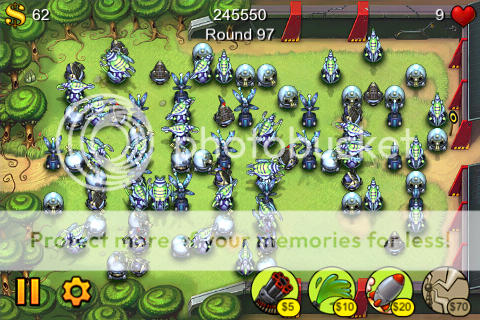
I have to admit it.  I'm finally getting tired of Tower Defense games.  I did a review and strategy feature on a few of them several months back, and since then I really haven't played much.  That is, except The Creeps!  Now, I'm not yelling at you.  The exclamation point is actually part of the name.

What's so different about The Creeps! that gives it such longevity?  Well, several things.  Read on. If you saw my reviews of Tap Defense, Fieldrunners, and 7 Cities (post 1, post 2), you'll know that different companies are pretty good at developing new and interesting approaches to the same old (new?) tower defense genre.  Fieldrunners and 7 Cities both contained two game types: one that ends when you beat all the levels and one that keeps on going until you lose all your lives.  The Creeps! does one better: it has 3 gameplay modes!  Okay, now I am yelling at you.  But let's go back a bit and talk about the game itself.

The Creeps! is a tower defense game.  And like all other tower defense games, you have enemies moving along the screen attempting to get to a goal.  You place towers, which cost money and come in different varies, to destroy your enemies before they get through.  If you let too many enemies get through, you lose.  Simple.

In The Creeps! you are the intrepid defender of... this little kid's bed.  He's creeped out because there are monsters literally coming out of his closet to get him.  Yeah, I'd be scared too.  The monsters move on a set path to the bed, where the kid's head is poking in and out from under his covers.  A recent update to The Creeps! from its creator, Super Squawk Software, adds some new towers and maps, adding to the longevity.  Now there are several graveyard maps, Mars maps, and undersea maps.

Regular maps can be played in Survival Mode, where you play a map for a certain number of waves and then you're done.  They can also be played in Endurance Mode, where you play an unending number of waves... well, unending until you die of course.  I'll get to the third mode in a bit.

The cool thing about The Creeps! is something I hadn't seen in any previous tower defense game: the ability to target certain enemies.  When it gets crazy, sometimes it's good to be able to tell your towers who to fire on, especially when one monster is just about go get to his goal.  With other games, you just have to rely on the game's A.I. to decide who your towers want to kill.  But that's not all.  The Creeps! features other inanimate objects that sit on the map that you can target with your towers.  There is some delay time in between waves of monsters that you can spend to get extra points and money from destroying these random objects.  They include trees, headstones, rocks, coral, and other stuff.  When these obstructions are destroyed, you can build towers in their place.  In harder levels, this adds an extra element of strategy in that you cannot win w/o clearing out most or all of these objects - there simply would not be any room to place your towers otherwise.

The above is especially important in the new and cool mode that Super Squawk added in the newest update.  It's called Doorbuster Mode.  As I said before, enemies come from the possessed closet door and move along a path to get to the kid's bed.  In Doorbuster Mode, your main goal, aside from destroying enemies, is to destroy the door from which they come.  The door takes a long time to destroy, so you need to get your hits in in between waves of enemies, and you need to upgrade your towers accordingly.  In some doorbuster maps, you cannot even place a tower close enough to reach the door until you've destroyed enough inanimate map objects.  Lots of fun.

I've written this much and haven't even talked about the enemies and the weapons!  I'll go through those really quickly.  The enemies as well as all the surroundings are really cartoony and colorfully drawn.  The game is fun to look at, really.  In the Mars and Graveyard maps (of which there are plenty), enemies include ghosts, zombies, vampires, mummies, and other horror film staples.  The sound effects, especially the sounds the enemies make when they die, are superb and hilarious.  I especially like the vampires saying "Ow, zat hurts!"  You really have to hear it for yourself.  In the underwater maps, you encounter creatures like sea urchins, eels, crabs, tiny whales, and snail-like things.  In all maps, every once in a while you'll run into bosses, which are simply larger versions of the regular enemies.

The towers really go along with the cartoony theme of the game.  Your main weapon is a toy ray gun that shoots blue laser beams.  There is also a boomerang, which homes in on enemies and causes explosion/splash damage.  The tower I like a lot from a creative and stylistic standpoint is the glue bottle, which is this game's version of the "goo tower" that slows enemies down.  I mean, it's a freaking bottle of glue!  How cool is that? Anyway, we also have a flashlight, which is kind of like a lightning/tesla tower, and a paper ninja star.  Ooh, those paper cuts hurt.  All regular towers can be upgraded up to a third level, which makes them faster and do more damage.

There are also super towers that work for a limited time only before needing to recharge.  These include a UFO that does massive damage to whoever it's hovering over, a giant black widow that does super glue effects, a tornado that can carry enemies backward or just keep them in one place for an easy kill, and an oil can that allows you to muck up the path that enemies travel along.  All these super towers cost a lot of money but can really be game changers. They also make use of the iPod touch or iPhone's accelerometer.  You tilt your device to control their direction.

The Creeps! is good enough for me to ramble on and on about it in this post, and at $0.99 it's really a no-brainer for anyone interested in Tower Defense.  If you didn't think the others were for you, you may want to reconsider and try this one out.  I believe there is also a Lite version.


Saturday, May 16, 2009

Stupid iPod Touch tricks

When you first get your iPod Touch you are blown away by the slick interface and all the neat features that you now can't do without. It's chock full of features, though some of them might not be very obvious. Some are in the instructions (which I rarely read, and I'm not sure that you do either) and others are not.

1) Music controls anywhere: a neat thing about the iPod Touch is that you can use other programs besides the music player while you are listening to your music. This is easily done by getting your music started and then pressing the Home button to return to the Home screen. From there you can choose whatever app you want to use - Mail, Safari, and even games that support you providing your own music. But what if you're using that app and you run into a song you don't feel like listening to? Double-tap the home button real fast. This'll bring up the music controls wherever you are, allowing you to pause, skip forward, or skip backwards. Tapping the Close button will dismiss the controls and return you to your regularly scheduled app, or touching the Music button will quit your current app and bring up the full fledged Music player app. The only downfall to this feature is that if you don't double click the Home button fast enough, or if you give it 3 clicks instead, it behaves as if you pressed it once, returning you to the Home screen.

1a) The double-tap feature also works if you're at the "Slide to unlock" screen.

1b) Sometimes apps (usually games) support you playing your own music but by default will silence your music upon startup and play its own music instead. To get around this, double tap the Home button while in the game and press Play. This will silence the in-game audio and resume your music instead in most (but not all) apps.

2) Screenshot: This is self-explanatory, but it's a real killer feature. Say you have something cool or hot on your screen and you want to save it for posterity (or at least to show your friends). You can save an exact picture of what you're seeing in your Photo library. Keep in mind that you have to be fairly quick about this. While holding the Sleep button, press and release the Home button, and then immediately release the Sleep button. The screen will flash white and you'll hear a camera sound. The iPod touch doesn't have a camera on it like its older sibling the iPhone, but you can still capture memories on it.

3) Auto-Pause: Say you're listening to something on your headphones and someone important walks up. You want to pause the audio because you don't want to miss the rest (as is often the case with audiobooks and podcasts) but you can't be bothered to quickly bring up the audio controls (either in the Music app or via the trick in #1). All you have to do is quickly unplug your headphones. You'll notice that the audio automagically pauses itself, because it knows you're not listening anymore. Sweet. When you plug your headphones back in, it doesn't resume automatically, which makes sense because while unplugged headphones = not listening, plugged-in headphones does not necessarily = you have the headphones on your ears. Bring the audio controls back up to resume listening.

4) Rearranging/deleting apps: tap and hold on any app's icon on the home screen until everything starts jiggling. Yes, that's right, jiggling. You'll notice that all the third-party apps will also now have "x" buttons on them, allowing you to delete them from your iDevice. Also in this mode you can tap-drag icons to arrange them to your heart's content. Remember that the bottommost row holds apps that are shown no matter what page you're on, so keep the most frequently used apps down there. Press the Home button to exit Jiggly Mode.

5) Quicker page changing: Once you get enough apps to fill several pages (believe me, this will happen pretty soon with all the free apps available), you may find yourself swiping your finger across the screen over and over to switch between pages. There is a little invisible area to the right and to the left of the "page indicators" at the bottom (the white and gray dots) where if you simply tap, it'll change the page. So if you tap just to the right of the page indicators, it'll go to the next page, and if you tap to the left of them, it'll go to the previous page. Also, if you're on any page other than page 1, pressing the Home button will return you to page 1. Handy if you have more than 2 pages of apps.

6) Battery saver: The killer feature of the iPod touch in my opinion is the wifi. Even when not connected to an access point, however, the wifi drains battery. If you go to your Settings app you can disable your wifi. I highly recommend doing this while not using wifi - for example, when you're driving somewhere, so it doesn't keep draining battery looking for access points. Turn it back on when you know you're going to use it.

6a) Auto-brightness: Along the same lines, you can find the Brightness setting in your Settings app. Nothing too fancy. You can adjust the brightness. Turn it down in dim lighting, and turn it all the way up in bright lighting. The interesting feature here is "Auto-Brightness" which uses the light sensor located near the top of the iPod's face. This feature can also help to save battery by sensing the light level in the room.

All of these tricks also work with the iPhone.

Tune in next time for some app recommendations and some more neat features.

Saturday, April 11, 2009

Mac Mini Adventures, Day 31

Where was Day 1? Well, it was supposed to be 31 days ago, but I'm a major slacker. So it's here. Let me back up.

Last month my dad got a Mac Mini for the purpose of making it a Home Theater computer, also known to others as a Home Theater PC (HTPC). The Mac Mini shall not be called an HTPC from here on out.

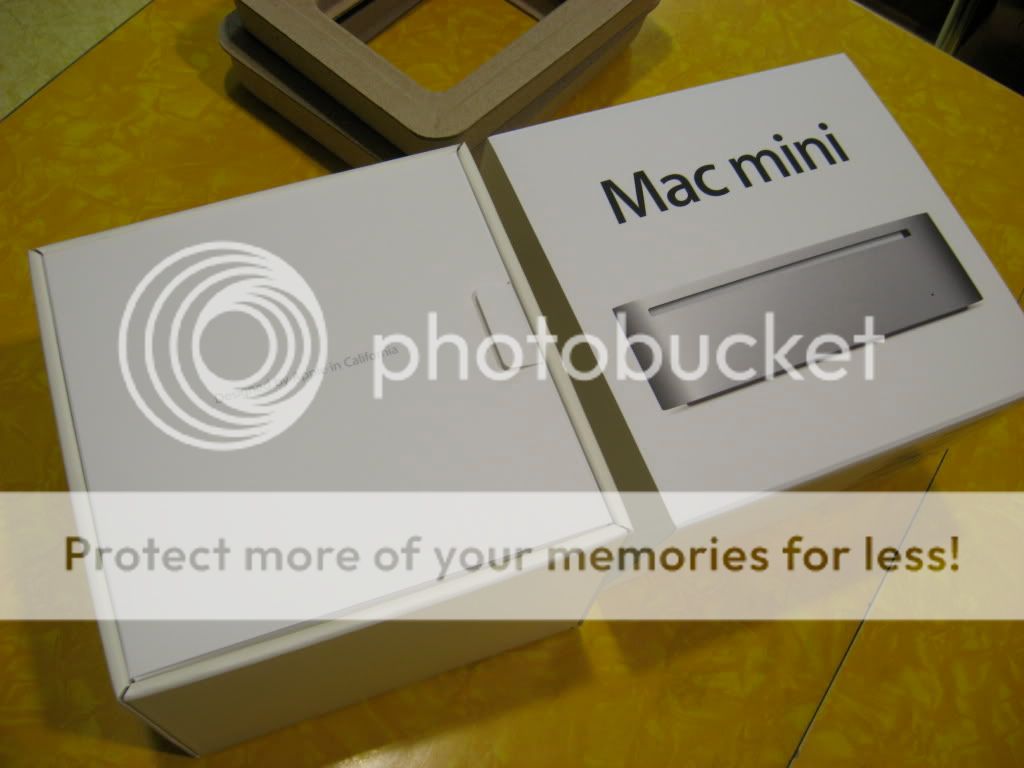
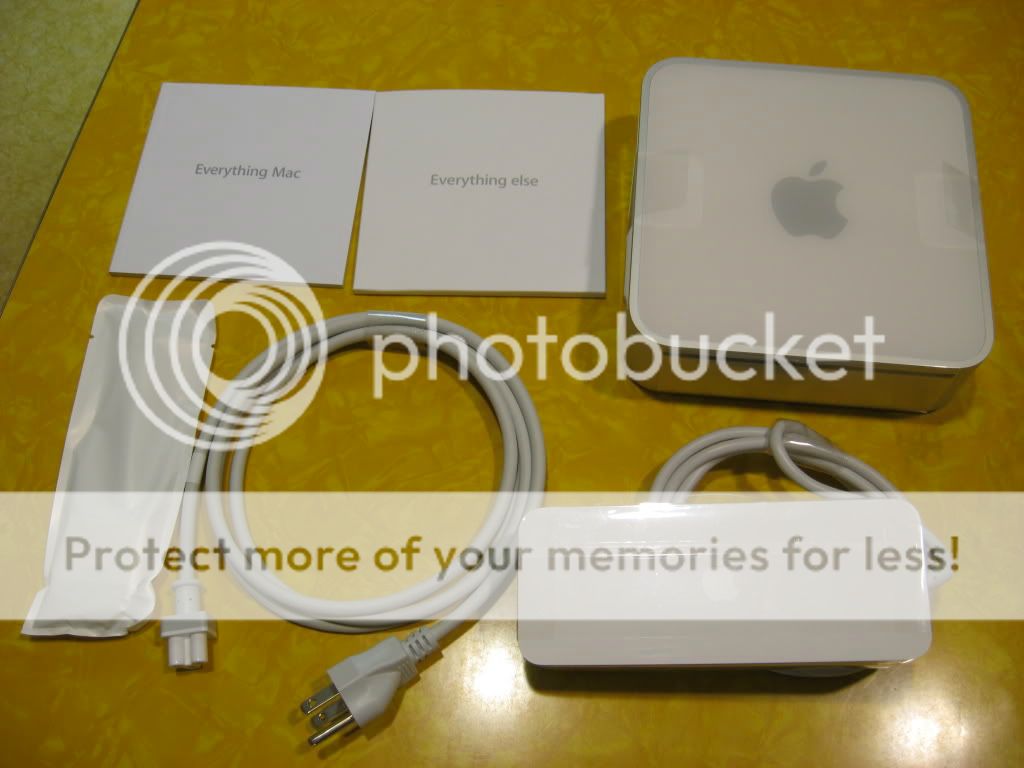
The mini is perfect because it can play 1080p video (high definition, 1920x1080 resolution) without being too pricey or taking up too much space or being unsightly in the TV room. Here are some of the pictures I took the night we first opened it up.


image name

image name

image name

image name

image name

image name

image name

image name


So far, the experience has been great. The only issue with the Mini itself is that the power cord is a little loose. So if we move the computer while it's running, it's liable to shut off due to disconnected power. While this is generally not a problem with a normal "desktop" computer, the mini is such a portable machine (6.5"x6.5"x2") that it just begs you to take it with you to the next room. My dad is quickly finding that it blows the doors off of his nearly 10-year-old Power Mac G4, a tower more than 4 times the size. The only thing keeping him from using the Mini as his main computer at this point is that it's connected to our 32" LCD HDTV. It's connected via a couple adapters. The Mac Mini has both a Mini-DVI connector and a Mini-displayport connector, the latter of which is a display standard created by Apple, who hopes that it will become an industry standard in the near future. We are using a Mini-displayport to DVI adapter connected to a DVI to HDMI adapter to display the video on the TV. The audio also goes to the TV, via a standard 3.5mm stereo jack, much like the one in your MP3 player of choice, although on the other end the audio is split into separate left and right channel plugs.

This setup works great. The only problem for me is that the TV tops out at 720p (1280x720 resolution) which is insanely weak for any sort of normal computing. For reference, if you have a 17" computer monitor your resolution is typically 1024x768, and for a 19" monitor you're typically seeing 1280x960 or 1280x1024. 720 rows of pixels on a 32" screen is great for video, but crappy for anything else. Fortunately, the Mini is there so we can watch movies and downloaded TV shows, and that's about it. We've found that even though the TV can't show anything bigger than 720p, the Mini itself handles 1080p video just fine, stutter-free, and I'm actually able to tell the difference between it and 720p video. I can't explain how that works, but it does.

I've tried to play Jedi Knight: Jedi Academy on the Mini, and it runs smooth as butter. I'm used to playing the game on my 5 1/2 year old Power Mac G4, which plays it well but not exceptionally. But for gaming, the mini is just a taste of things to come for my next computer...

Sunday, April 5, 2009

Free stuff-limited time

Edit2: Acorn is spoken for.

Edit: added iSale to the list and changed the expiration date.

Sorry to sound like an ad, but read this and ACT NOW.

I'll make this simple. I'm buying a MacHeist software bundle and it's got some apps that I may not necessarily use. So if you want the eBay page creation app iSale,the photo editing app Acorn, the picture touch-up app Picturesque, or the animation suite program Kinemac for FREE, let me know and I'll gift it to you. Google them if you don't know what they are and want more info. There are other apps in the bundle (see link above) but the ones I mentioned are ones I most likely won't use. You can look at the list and ask me about any of the others if you're interested. Please tell any Mac-using friends too.

These programs are Mac only, so sorry Windows users. I need to know as far in advance of Tuesday, 4/7, midnight Eastern Daylight time as possible, preferrably 9pm eastern, 6pm pacific on 4/7, so I can gift them to you during the buying process. This is "first come, first serve". All I need is your name and email address.

Tuesday, March 10, 2009

Kindle App

I first mentioned the free Kindle App for iPhone in this post. At the time, I had downloaded it but had not tried it out. Today I got some time to play around with it on my iPod Touch, and here's my report.

As I said, the app is free. When you turn it on, you get the Kindle "splash screen" showing a person sitting under a tree reading a book. At the top it says "Amazon Kindle" and at the bottom it says Kindle for iPhone, with Whispersync. More on that later. When I entered the app, it showed me the "Home" screen. This is where the books are, though it didn't come with any books. This list can be sorted by Recent, Title, and Author. On the top right there is a "Get Books" button. I had assumed that it would take me to a mobile Amazon.com store where I can buy books, but instead it showed me a small page saying "Get the best shopping experience by visiting www.amazon.com/kindlestore on your Mac or PC. You can also use Safari on your iPhone to buy books." Well, I wanted to get the whole mobile experience on my iPod Touch, so I avoided going on my computer.

Fortunately, this page provides a link to the Amazon Kindle Store, which will open in Mobile Safari on your device. The Kindle Store is simply a section of Amazon.com dedicated to selling eBooks for the Kindle device (and now for the Kindle iPhone app as well). There doesn't seem to be a mobile-optimized version, so there's going to be some zooming and pinching. Generally not a bad experience though. Not wanting to spend money at the time, I just started looking around, and managed to find a couple user-created "lists" on the left column of the page. These lists happened to be lists of free Kindle books. I was soo there. Currently, the Kindle versions of Red Mars by Kim Stanley Robinson and Blood Engines by T.A. Pratt are free, so having heard of them recently I figured I'd buy those books... for free.

Keep in mind that you need an Amazon account to even use the app, and of course to buy Kindle books. Your existing Amazon account will do; no need to get a special Kindle account. I clicked "Add to cart" on one of the books, and it said "you cannot buy this item with a cart, please visit the item's info page to purchase." I thought that was odd, but it didn't stop me for very long. On the book's page there's a Buy Now with 1-Click button, which I promptly tapped. The next page I was presented with said something to the effect of "thank you for purchasing this book. It will be sent to your iPhone/iPod Touch the next time you open the Kindle app." Isn't that cool? It knew I was going to use the eBook on my iPod because I'd logged into my Amazon account when opening the Kindle app earlier. I bought both books mentioned above for a total of $0.

So I went back to open the Kindle app, and the Home screen showed an Activity icon, and after a matter of seconds, both books that I had purchased appeared on the list. I picked one randomly, Red Mars. The reading interface should be fairly familiar to those who use their iPod touch or iPhone for looking at pictures. Each page of the book is a screen on your device, and you swipe left to go to the next page and swipe right to go back. Tapping the screen brings up some onscreen controls, including a progress slider, which 1) indicates how far you are and 2) allows you to slide to go directly to a certain part of the book. You can also create and access your bookmarks from here, as well as choose 5 different sizes of text. Great for those who can't read smaller text as well. One neat feature for owners of multiple iPhones, iPods, and/or Kindles, is the sync feature, which gets your current page and synchronizes your reading progress across all devices. So if you use your iPhone on the go but read your Kindle when you go home, when you get home your Kindle will be on the right page.

This is the extent of my testing. It's just a very brief first impression. So far, it works. I don't know if I really plan to do a lot of reading on my iPod, but the fact that the option is here in the Kindle app, along with others such as Classics or Stanza, really improves the versatility of the device. I don't plan to get a Kindle any time soon, but Amazon made a great choice in making this app available to those like me. After all, they will be making money on book sales.

Sunday, March 8, 2009

iDracula Screen Shots

Here are some screenshots of iDracula, as promised. I'll try to get some that are more representative of the action.

Just starting out


Werewolves


Game Over Screen

Wednesday, March 4, 2009

Killing Monsters

Well, now that I've given a boring description of a bad game, it's time to write an exciting review about a good game.

Ever felt like your life is too boring? Wouldn't it be great if you were to walk out into the street and suddenly be surrounded by hordes and waves of monsters? And you were armed only with a single shot musket? Well it ain't gonna happen. Not in real life anyway.

But for the absolute bargain price of $0.99US(at the time of this writing) you can pick up the iPhone/iPod touch game iDracula and live your dream.

Built around blood-boiling metal-type music and Diablo II-style graphics, iDracula is described as a "survival shooter." You play as a Van Helsing type dude who must fight off endless waves of werewolves, vampires, and other mythical creatures. Two "virtual directional pads (D-pads)" are shown on screen; the lower left one is for moving your character around and the lower right one is for aiming the gun and firing.

The two game modes as of this writing are Survival and Rush. First, survival. At the beginning the enemies come in small groups and kind of move slowly so you can easily pick them off. As you kill more, they slowly get stronger, faster, and more numerous. To help you out, the game has the enemies randomly drop items, including health recovery potions, stronger weapons including a crossbow, flamethrower, shotgun, and a BFG, as well as ammo and "omens". Omens are the only items that stay with you between play sessions, and determine your rank as an iDracula player. You gain points by killing monsters, and after gaining certain amounts of points you earn a "perk" which allows you to choose from a variety of permanent (e.g. increase max health) or temporary (e.g. increased damage) upgrades.

Once you get to a certain point the game gets really frantic with enemies coming at you from all over the place. This where the game shines. Even with so much activity, the beautiful graphics engine doesn't hiccup, doesn't skip a beat. And there is a certain great sense of satisfaction in taking out hordes of ugly monsters in your spare time.

Oh yeah, real quick note on Rush mode. In this mode, you are equipped with a really powerful weapon from the get-go (the chaingun when I played) and they just throw tons and tons of werewolves at you right off the bat. Quick and intense.

I'll try to post some screenshots later, but in the meantime get this game before it goes up to $2.99 at some unspecified point in the future.

iDracula: iTunes Store, AppShopper

EDIT: here's a sneak preview video of the upcoming Free update to owners of iDracula

Not Impressed

When the iPhone Standard Developer Kit (SDK) was announced, many companies and individual developers got really excited. Longtime gaming company Sega saw this as a great opportunity to create a game that's perfectly suited to the tilt controls included in the iPhone's feature list.

Before the iPhone Application Store even debuted in July 2008, a working demo of Sega's Super Monkey Ball was shown at an Apple event, and it was said to have been created in about a week.

Let's take a step back. In 2001 the Nintendo Gamecube received a game called Super Monkey Ball, which was a port of a Japanese arcade game by the name of Monkey Ball, released in 2000. You played as a monkey in a ball (go figure) and the goal was to control the ball as you navigate around a twisting platform suspended in the air while collecting banana icons and trying to get to the goal. It was supposedly a ton of fun, but I never played that version.

Sega was right to recognize the iPhone as a perfect platform to port Super Monkey Ball to, since the concept lent itself greatly to being controlled by tilting the phone right to move the ball right, tilting left to move it left, and tilting it forward to accelerate. Super Monkey Ball debuted on the App Store on August 27 at $9.99 to much hype and fanfare. It even reached #1 on the top 10 paid apps list and stayed there for quite a while.

At the time, there still were not very many games to choose from, and there was no "norm" price for this type of game, or any app for that matter. People were a little annoyed by the controls in Super Monkey Ball for iPhone, but since it was one of the only games out there, they took it in stride because no standard had been set yet. This and the hype surrounding it for weeks prior kept it at the top spot on the app store.

Two updates, five months, and a $2 price drop later, I actually became curious about whether it had improved, but I didn't want to spend the $7.99 just to test it out. By then I'd played many great games on my iPod Touch, and wasn't sure it would be worth the $8 for this previously imperfect game.

Well, thanks to the free Lite version released in January 2008, I've been able to find out what the deal is. I'll give you the bottom line now: Don't get this game. Unfortunately, if you were going to get this game, you've probably already gotten it. And I am sorry that you did. And you are probably sorry as well. I don't know what they fixed between the 1.0 and the 1.0.2 versions, but it doesn't seem like anything.

The game is not fun and it feels like a slight little tilt in any direction sends your freaking monkey spinning in a circle. Somehow, for a game that took a week to finish and has had months to perfect, Super Monkey Ball for iPhone is terribly broken, and boy am I glad I was able to try it for free. I gave it a shot. I really, really did. But in the end, I can't recommend this at all.

In the future, my negative reviews will be much shorter. But history lessons are so much fun, aren't they?


Super Monkey Ball: Wikipedia link, AppShopper Link

Tuesday, March 3, 2009

Beejive Sale and Free Kindle App

Here's a quick one. There's a multi-service IM app for the iPhone and iPod Touch called BeejiveIM. Out of all the IM apps, it is my opinion that Beejive is far and away the best. Despite the fact that the others are mostly free and BeeJive is regularly $16, if you're going to send and receive a lot of IMs, I would totally recommend Beejive. I will try to do a review of it later, but my point here is to mention that it's currently on sale for $10 for this week only. This is the price I got it for (Black Friday sale, I believe) and it's back down to it now. That's a whole 33% off for what I feel is the most useful app I own.

Now on the other side of the spectrum is the Kindle App. The Kindle is a two-part product from Amazon. One part is a handheld "eBook" reading device (the Kindle itself), and the other is the Kindle Store, where you can purchase books and periodicals that get wirelessly beamed to your Kindle. However, today Amazon released the free Kindle app for iPhone and iPod Touch, allowing those users to buy books and periodicals from the Kindle Store and view them on their iPhones/iPods; no Kindle required. If you like or are interested in reading books on your iPhone or iPod, check out the free Kindle app. Disclaimer: the books are not free.


Beejive Links: iTunes Store, AppShopper

Kindle Links: iTunes Store, AppShopper

Friday, January 23, 2009

Tower Defense Redux

Looks like there was at least a little bit of interest in my last post about Tower Defense games on the iPod, so here's a followup.

First, I'll go over the bonus challenge mode "This is Sparta" in the game Tap Defense. I finally got around to beating this mode in Easy and Medium, and both of them rely pretty heavily on the Earthquake tower. To recap, the This is Sparta mode has these special rules:

Start with 3 lives, rather than 20
Start with 3 halos, rather than 0
Start with 300 gold (in honor of the movie "300")
9 Towers Max, as opposed to normal rules where you're only limited by space and gold
3 of each tower max

This is Sparta: Easy mode
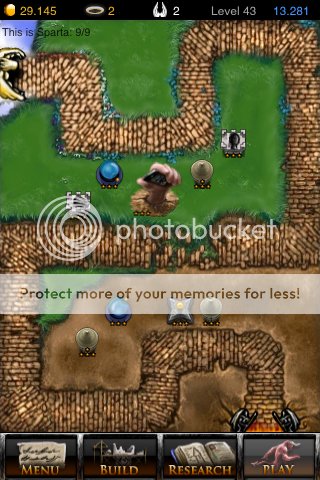
First, I used two of the three starting halos to increase my interest rate. You want to be in the position, in the second half of your game (round 21+) to be really racking up the money to a couple thousand. More on that later. To start, get two arrow towers along the bottom half of the map, as shown in the picture. They don't have to be exactly in those places, but preferably they should be able to reach both the bottom area of the path and the part of the path that runs through the middle. Like in the normal game, you'll want to use as few towers as possible at as low levels as possible while still killing all enemies, because that saves you money.

Anyway, this placement for your first two arrow towers should be fine, though sometimes the game throws a bit of a curveball at you and bunches up those gremlins such that the arrows can't get 'em all at once. In that case, place an arrow tower near the upper right corner of the screen. Unfortunately, it can be a bit tricky knowing whether your towers will cover adequately until it's too late, especially if you're trying to minimize your money spent. I had to restart quite a few times and use trial and error until I got a better feel for how little coverage I could get away with. The first few rounds, arrows should suffice. Since you've already used your max of 3 arrow towers, it's a good idea to upgrade them. It's truly amazing what difference a level 3 Arrow tower makes. In fact, a single level 3 arrow tower can likely handle the first three rounds of enemies no problem. But of course that would be more costly. Wait 'til you get more money, and you'll want to upgrade all three arrow towers to level two some time before round 10.

For the first round of succubi and then demons, you may want a cannon in there somewhere. Preferably it should be in the top half of the map, so the arrows can soften up the enemies first and the cannon can make the kill. Despite the game's advice, fire cats, at least in the early rounds, need not be dealt with using water towers. Your upgraded arrows and single cannon tower should suffice. I actually used my first 6 halos for interest rate. Upgrade all your arrow towers to level three when you get into the teen rounds, and you may want a second cannon and a water tower as well. That brings you to 6/9 towers. Also keep in mind that arrow towers can go up to level 4. In the first 2/3 of the game, it's not a good idea to make all three of your arrow towers level 4, though one level 4 arrow tower can be really really helpful, and often kill enemies in one hit. The downside is that its refire rate is very, very slow.

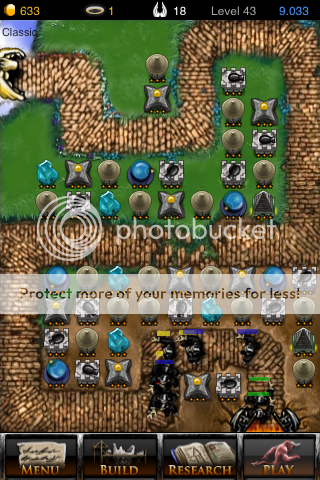
When you get above round 20, if you've been using your money wisely (more on that later), you should have enough to get an earthquake tower (of course, you will want to save two halos to research it). I'm not entirely sure on the total amount of money, but have at least 2000 gold to spend on it. At level 3, the earthquake tower has enormous range, and does 2000 damage. Since you're severely limited in the number of towers you can create, the range and damage done by the earthquake is invaluable. With the earthquake and other towers in the positions shown in my picture, you should do fine. Just be sure to use your earthquakes liberally, because at level three the recharge time is very good. Later in the game, it might be helpful to replace an arrow tower with a level 3 storm tower to quickly whittle some enemy energy down before being pulverized by the earthquake.

Congrats! You've beaten This is Sparta on Easy!

Here are some more tips for money.
-Never ever create a tower right at the end of a round. You're spending money on it but not getting any utility for that round, and even worse, you won't get as much interest. Wait 'til the beginning of the next round to build towers. If you must place a tower as an emergency measure, do it as soon as you can so you can get the most utility out of it for that round.
-If your interest rate is high enough, and depending on the tower, you can try selling a tower right before the round ends, so you get extra interest from it. This is generally not a good idea for, say, a level 3 Storm tower or Earthquake tower, because you'll probably lose more than you gain.
-This applies more to the normal game than This is Sparta, but still applies: often the benefit you get from upgrading your towers (more damage, higher refire rate) outweighs the benefit from simply adding more level 1 towers, despite the fact that adding more towers may be cheaper. You want to maximize your interest rate, but doing so at the cost of letting a few enemies through is not a good compromise, in my opinion. And when you're playing the Sudden Death mode or This is Sparta, it's a terrible, unthinkable compromise.


I'm running long, so I'll do the Medium tips very quickly.

This is Sparta: Medium mode
The tips from Easy mode will also work here. The difference is that since the path is so much shorter and less circuitous, you have much less leeway to kill the enemies. You have to get them fast, or else. So you'll be upgrading your arrow towers sooner and adding cannons sooner, in order to kill the baddies at an earlier point on the path. It's important to use the top and bottom of the screen in later rounds, because upgraded towers in the middle of the screen will generally just follow the one enemy that's at the front of the pack. There's really only one place you should put your level three earthquake tower for maximum coverage. See picture.

That's it! I was going to talk about two other Tower Defense games, Zombie Attack and The Creeps! But perhaps next time.

Monday, January 19, 2009

I am the winner!

I woke up Sunday morning and checked my iPod for email, which I do every morning now. I was somewhat surprised to see a message regarding me winning some contest. My half-asleep state combined with my extensive experience with junk mail led me to believe it was just spam. But after doing a quick double take, I realized that it was actually a reply to a mail that I myself had sent. I read it more carefully and...

In December I caught wind of a contest: post your best screenshot from a computer game. It was a collaboration between the MacGamer.com website and Parallels, who makes the popular Virtualization software "Parallels Desktop" for Mac. I dug around in my hard drive to find a screenshot that I could submit, not really thinking I'd win or anything, but it was worth a couple minutes to give it a shot anyway (And yes, I keep screenshots from my gaming in a folder on my computer).

Long story medium, I won! Apparently they liked my picture enough to give me a copy of Parallels. Awesome! Please check out the site. Looks like they're trying to get on their feet, and it looks pretty good so far.

Thanks very much to both Parallels and Tom Herring at MacGamer for making the right choice ;)

The pic below is cut off, so click on it to see the whole thing.

Direct link to the story is here.

Friday, January 2, 2009

Tower Defense

In the process of doing research for this blog post, I got sidetracked... for a long time. If you don't know, Tower Defense is a new genre of game where you erect towers that shoot at groups of enemies. The enemies walk, fly, ride, or sail from one end of the map to another, and your objective is to prevent them from getting there.

Apparently the original tower defense game, aptly named "Desktop Tower Defense," is a flash game that can be played in any computer's web browser at http://www.handdrawngames.com/DesktopTD/Game.asp. Until about thirty minutes ago, I hadn't played this version at all. But through my iPod Touch I've become quite familiar with its successors/homages. Here are three iPhone/iPod Touch games that have really been stealing so much of my free time over the break.

First, Tap Defense. Tap Defense has become very popular and is very accessible because of its price. Yup, it's totally free for iPhone/iPod Touch users. There is a set path that leads from Hell to the gates of Heaven, and you place towers along the path to prevent the monsters of hell from invading. You get 20 lives, and each enemy that enters Heaven takes one life away. The game is over if you lose all 20. There are various enemies, including gremlins, locusts, cerberuses, demons, succubi, firecats, and the Devil himself. Gremlins and cerberi have average amounts of health and speed, whereas firecats are weaker but extremely fast. The Devil, demons, and succubi are very slow but can take a lot of hits. Fortunately, you have different types of towers to counteract these enemy attributes. The standard arrow tower is fast-firing but somewhat weak. Cannon towers have a slower refire rate but do good damage and also affects an area rather than just a single enemy. Water towers shoot water, which is helpful for slowing down faster enemies. Money is earned by killing enemies, and is used to buy or upgrade existing towers, making them faster, stronger, and/or give them longer firing range. You can sell towers you built previously to recoup part of its value if you need the spot or the money back.

The enemy and tower types, as well as the concept of money and upgrading towers is common to just about all tower defense games, but there are some things that make Tap Defense unique. First, halos. You obtain halos by completing certain levels. Halos can be used to "research" new tower types beyond the basic three - once researched, a tower will be permanently available for purchase if you have the money.

Halos can also be used to increase your interest rate - which is another thing unique to Tap Defense. Let me explain. The enemies come in levels, or waves. Once a wave of enemies has gone by and you still have 1 or more lives left, you are shown a "level complete" screen, where you earn bonus money equal to (your current money) x (interest rate). On the easy difficulty level, interest rate starts at 10% so if you end a wave with $90 you get $9 bonus and will start the next level with $99 to spend. This encourages players to conserve money and take extra care to place towers strategically so as to get more bonus cash. If you have an iPhone/iPod Touch I strongly encourage you to try Tap Defense. The price is right.

---

The next game is Fieldrunners. Fieldrunners is currently $4.99 but they claim the price will go up soon, so grab it now. FR has been very highly touted on the Internets since its release in late November. I was hesitant to spend the money until recently, because at first I didn't know if I'd like the genre, and then after I got Tap Defense I figured Tap Defense would be all I needed. But I decided to take the plunge in a moment of adventurousness and spend-thriftiness. Unlike Tap Defense, which has a set path whose shape is determined by what difficulty level you're playing on, Fieldrunners is more like Desktop Tower Defense in that it's a wide open field and YOU determine what path the enemies take.

How does this work? Well, enemies will walk around your towers in a path that will take them to their goal in the shortest distance possible. So it's up to you to place the towers in the most winding, circuitous arrangement possible so enemies will take longer to get to their destination and to give your towers more time to shoot the enemies down. In FR, the enemies are human soldiers of different sizes that are on foot or on motorcycles, as well as small tanks and flying vehicles. Like in Tap Defense, they have different speeds and strengths and weaknesses. FR has only 4 tower types, as opposed to Tap Defense's 7. The basic machine gun is weak but fast, the goo tower does no damage but slows enemies down, missiles home in on enemies and do high area damage, and the expensive lightning tower does massive damage to a single target. Like in Tap Defense, you spend money to upgrade towers all the way to a max of level 3, which increases firing rate and damage (or slowdown in the case of the goo tower).

Flying enemies totally circumvent your tower "maze" so it's necessary to add some extra goo, missile, or lightning towers along the straight path from the enemy's entrance to their goal. Another thing that makes FR more like Desktop Tower Defense and less like Tap Defense is in between waves, the game does not stop for a Level Complete screen, but instead simply gives you a short countdown to the next wave. However, both FR and Tap Defense allow you to pause the game while you strategize and remove or place more towers.

FR comes with two different maps: a grassy field where the enemies go from left to right, and the "Crossroads" map, where one group of enemies goes from north to south and the other goes from west to east at the same time. This one is tricky because you have to cover both the south and east exits with your towers. This idea of having to use the right combination of tower type and tower location added an extra dimension not present when I was playing Tap Defense. And another neat feature is that you can use the pinching motion that all iPhone/iPod Touch users are familiar with, in order to zoom in on the action.

---

Finally, there's 7 Cities TD. Like Tap Defense, 7 Cities enemies move along a set path. The premise is that you're in charge of protecting 7 cities, each of which is situated along a river and each of which corresponds to a unique map. The enemies are pirate ships and sea creatures, and your towers line the coastal path leading to a suspiciously Mayan-style temple. Like FR, 7 Cities does not stop in between waves of enemies but gives a countdown to the next wave to let you make upgrades and modify your tower arrangement. Unlike both FR and Tap Defense, however, 7 Cities does not allow you to perform actions while the game is paused, making it a significantly more frantic game.

A unique aspect of 7 Cities is that, like in RPGs, your towers gain experience points from doing damage to enemies. At levels that are multiples of 5, your tower is eligible to be transformed into a modified version of itself: arrow towers can be transformed into "Ballista towers," which are like giant crossbows, and cannon towers can be transformed into trebuchets which cause burning damage. Defeating enemies also rewards you with blue gems, which are used to do normal upgrades to your towers.

One more thing that sets 7 Cities apart from the other two games is its music. It's strictly synthesized midi-quality music, but all things considered it's not bad and it really adds to the atmosphere of the game. So far I have completed 6 of the 7 city maps on easy, but the 7th one seems significantly harder as there are three paths for the enemies to approach along, and thus three paths among which you must divide up your firepower.

---

I'm not prepared to declare one of them a winner, as each has its own unique gameplay elements. Tap Defense has recently been given five new gameplay modes which adds some replay value to the main game. In "This is Sparta" mode, you start with 3 halos to use as you please, but instead of the normal 20 lives you only get 3. And only 9 towers are allowed on the map at any given time. You may still sell existing towers to make room (and cash) for others. In "Sudden Death," the game is like normal except for your number of lives, and in "Ten Towers" you get only 10 towers while everything else is the same. The "Silver Spoon" mode is exceedingly easy, as you start out with tons of cash and extra halos, and if you can manage to keep your cash reserves up, even a 10% interest rate can make you rich very quickly. Finally, "Credit Crisis" mode gives you $4,000 to start with and that's it... no money from enemies nor from interest. All these new modes are pretty fun, though Silver Spoon is just way too easy.

Fieldrunners has classic and endless modes for both maps. Endless mode needs to be unlocked through completing classic mode once, and differs from classic in that it keeps going past the standard 100 levels until you lose all your lives. 7 Cities also has an endless mode, though I have not given that a try.

---

These three games have cost me a total of $10, and for all the fun I've had with them, I'd say it's been worth it. If this has interested you at all, please check them out. If you don't have access to an iPhone or iPod Touch, at least check out the Desktop Tower Defense flash game linked above.

Happy new year to all, and Go Bruins!

Wednesday, December 31, 2008

iPhone app sales and new games

I've been totally remiss in posting anything at all, partially because I've been out of town. So I thought I'd put up this quick one. If you like the recommendations, please leave a comment.

Since the inception of the iPhone/iPod Touch app store in July, developers have been running limited time sales on their apps to bring in more customers. Sites like appshopper.com are great to follow if you want to know if the app you've been considering has come down in price, or just to see what's out there, available for cheap or even for free. The App Store provides a really really convenient way to get apps on your iPhone or iPod, but the sheer number of cool apps can help you to empty your bank account really really fast. That's why I check sites like appshopper as well as The Unofficial Apple Weblog at tuaw.com (i.tuaw.com for a special iPhone-formatted site) and toucharcade.com, which focuses more on games.

Speaking of Touch Arcade, today they posted a link to NewYearAppBlowout.com, which is a collaboration between several app developers to celebrate the new year by discounting their apps. If you have an iPhone or iPod Touch I encourage you to check them out. Five of the apps offered are free, including DuckDuckDuck, a casual tilt-game where you maneuver rubber duckies onto miniature whirlpools in a pond. I definitely recommend that one, especially because the price is right.

Finally, there's a new game that's been announced called "Rebel Onslaught," which will be a 3-D space shooter which seems to be in the vein of the Starfox or Star Wars: Rogue Squadron games. Screenshots are available here. Definitely looking forward to this one!

Saturday, October 4, 2008

Steve Jobs acting

For those five of you who don't know who Steve Jobs is, he's the CEO of Apple, Inc. You know, the company that makes iPods and iPhones and the best operating system in the world.

Well, here he is at the 2007 MacWorld Expo showing off the (then new) iPhone. I just happened to pause the video while he was making this kind of half-smirk, and I said "Hey, where'd Steve go? How did they get Robert DeNiro on stage??"

Sunday, September 28, 2008

Check this out, part 5

You've heard of case mods - it's like tricking out a car to make a hot rod, except for computer cases. Well, this one's the best I've seen in a long time. This one's a Lego Mac Pro. Yeah, the case is made entirely of Legos. Check it out at http://www.macuser.com/huh/the_lego_mac_pro_timelapsed.php.